<?xml version="1.0" encoding="utf-8"?>
<feed xmlns="http://www.w3.org/2005/Atom">
  <title>DoEquitable</title>
  
  <subtitle>never escape</subtitle>
  <link href="/atom.xml" rel="self"/>
  
  <link href="http://doequitable.com/"/>
  <updated>2017-12-21T06:08:55.065Z</updated>
  <id>http://doequitable.com/</id>
  
  <author>
    <name>coghost</name>
    
  </author>
  
  <generator uri="http://hexo.io/">Hexo</generator>
  
  <entry>
    <title>Celery Next Step</title>
    <link href="http://doequitable.com/20171220/python/tlibs/celery/celery_step2/"/>
    <id>http://doequitable.com/20171220/python/tlibs/celery/celery_step2/</id>
    <published>2017-12-19T16:00:00.000Z</published>
    <updated>2017-12-21T06:08:55.065Z</updated>
    
    <content type="html"><![CDATA[<h1 id="Celery-Next-Steps"><a href="#Celery-Next-Steps" class="headerlink" title="Celery Next Steps"></a>Celery Next Steps</h1><ul><li><a href="http://blog.csdn.net/happyanger6" target="_blank" rel="external">参考</a></li></ul><h2 id="在应用中使用Celery"><a href="#在应用中使用Celery" class="headerlink" title="在应用中使用Celery"></a>在应用中使用<code>Celery</code></h2><h3 id="项目布局"><a href="#项目布局" class="headerlink" title="项目布局"></a>项目布局</h3><figure class="highlight sh"><table><tr><td class="code"><pre><div class="line">(.venv) &lt;HOME_DIR&gt;/code/distr_q</div><div class="line">.</div><div class="line">├── __init__.py</div><div class="line">└── celery_next</div><div class="line">    ├── __init__.py</div><div class="line">    ├── app.py</div><div class="line">    ├── client.py</div><div class="line">    └── tasks.py</div></pre></td></tr></table></figure><a id="more"></a><h4 id="app-py"><a href="#app-py" class="headerlink" title="app.py"></a>app.py</h4><p>worker app任务执行端, 指定需要运行的 tasks 模块, 指明 broker/backend</p><figure class="highlight python"><table><tr><td class="code"><pre><div class="line"><span class="keyword">from</span> celery <span class="keyword">import</span> Celery</div><div class="line"></div><div class="line">app = Celery(</div><div class="line">    <span class="string">'tasks'</span>,<span class="comment"># app 名字</span></div><div class="line">    broker=<span class="string">'amqp://admin:admin@localhost/cc'</span>,</div><div class="line">    backend=<span class="string">'rpc://admin:admin@localhost/cc'</span>,</div><div class="line">    include=[<span class="string">'distr_q.celery_next.tasks'</span>]<span class="comment"># tasks 模块文件</span></div><div class="line">)</div><div class="line"></div><div class="line">app.conf.update(</div><div class="line">    result_expires=<span class="number">3600</span>,</div><div class="line">)</div><div class="line"></div><div class="line"><span class="keyword">if</span> __name__ == <span class="string">'__main__'</span>:</div><div class="line">    app.start()</div></pre></td></tr></table></figure><h4 id="tasks-py"><a href="#tasks-py" class="headerlink" title="tasks.py"></a>tasks.py</h4><p>任务模块内容, 具体任务</p><figure class="highlight python"><table><tr><td class="code"><pre><div class="line"><span class="keyword">import</span> os</div><div class="line"><span class="keyword">import</span> sys</div><div class="line"></div><div class="line">app_root = <span class="string">'/'</span>.join(os.path.abspath(__file__).split(<span class="string">'/'</span>)[:<span class="number">-3</span>])</div><div class="line">sys.path.append(app_root)</div><div class="line"></div><div class="line"><span class="keyword">from</span> distr_q.celery_next.app <span class="keyword">import</span> app</div><div class="line"></div><div class="line"></div><div class="line"><span class="meta">@app.task</span></div><div class="line"><span class="function"><span class="keyword">def</span> <span class="title">add</span><span class="params">(x, y)</span>:</span></div><div class="line">    <span class="keyword">return</span> x + y</div><div class="line"></div><div class="line"></div><div class="line"><span class="meta">@app.task</span></div><div class="line"><span class="function"><span class="keyword">def</span> <span class="title">mul</span><span class="params">(x, y)</span>:</span></div><div class="line">    <span class="keyword">return</span> x * y</div><div class="line"></div><div class="line"></div><div class="line"><span class="meta">@app.task</span></div><div class="line"><span class="function"><span class="keyword">def</span> <span class="title">xsum</span><span class="params">(numbers)</span>:</span></div><div class="line">    <span class="keyword">return</span> sum(numbers)</div></pre></td></tr></table></figure><h4 id="client-py"><a href="#client-py" class="headerlink" title="client.py"></a>client.py</h4><p>任务发起端</p><figure class="highlight python"><table><tr><td class="code"><pre><div class="line"><span class="keyword">import</span> os</div><div class="line"><span class="keyword">import</span> sys</div><div class="line"></div><div class="line">app_root = <span class="string">'/'</span>.join(os.path.abspath(__file__).split(<span class="string">'/'</span>)[:<span class="number">-3</span>])</div><div class="line">sys.path.append(app_root)</div><div class="line"></div><div class="line"><span class="keyword">from</span> distr_q.celery_next <span class="keyword">import</span> tasks</div><div class="line"></div><div class="line"><span class="keyword">if</span> __name__ == <span class="string">'__main__'</span>:</div><div class="line">    tasks.add.apply_async((<span class="number">2</span>, <span class="number">2</span>), queue=<span class="string">'lopri'</span>, countdown=<span class="number">10</span>)</div></pre></td></tr></table></figure><h3 id="启动-worker"><a href="#启动-worker" class="headerlink" title="启动 worker"></a>启动 worker</h3><figure class="highlight sh"><table><tr><td class="code"><pre><div class="line"><span class="comment"># 不指定queue, 默认指向 queue-&gt; celery</span></div><div class="line">celery -A  celery_next.app worker -l info</div><div class="line"></div><div class="line"><span class="comment"># 指定queue lopri</span></div><div class="line">celery -A celery_next.app worker -l info -Q lopri</div></pre></td></tr></table></figure><h3 id="停止-worker"><a href="#停止-worker" class="headerlink" title="停止 worker"></a>停止 worker</h3><blockquote><p>Control-c</p></blockquote><h3 id="后台运行"><a href="#后台运行" class="headerlink" title="后台运行"></a>后台运行</h3><p>主要依据<code>celery multi</code>命令来在后台启动一个或者多个<code>workers</code></p><figure class="highlight sh"><table><tr><td class="code"><pre><div class="line"><span class="comment"># celery multi &lt;CMD&gt; w1 -A celery_next.app worker -l info</span></div><div class="line"><span class="comment"># CMD in [start, restart, stop, stopwait]</span></div><div class="line">celery multi start w1 -A celery_next.app worker -l info</div></pre></td></tr></table></figure><ul><li>stop: 是异步执行的, 并不等待worker关闭, 会直接退出</li><li>stopwait: 同步等待所有执行结束才退出</li></ul><h3 id="注意"><a href="#注意" class="headerlink" title="注意"></a><code>注意</code></h3><figure class="highlight plain"><table><tr><td class="code"><pre><div class="line">celery multi doesn’t store information about workers so you need to use the same command-line arguments when restarting. Only the same pidfile and logfile arguments must be used when stopping.</div></pre></td></tr></table></figure><p>celery不会存储workers信息, 所以在重启的时候,你必须提供相同的参数. 在停止的时候, 只有 pidfile和logfile参数必须得提供.</p><p>默认情况下会在当前目录创建<code>pid,log</code>文件, 为了防止多个workers相互覆盖, 推荐指定独立的目录</p><figure class="highlight sh"><table><tr><td class="code"><pre><div class="line">mkdir -p /var/run/celery</div><div class="line">mkdir -p /var/<span class="built_in">log</span>/celery</div><div class="line"></div><div class="line">celery multi start w1 -A proj -l info \</div><div class="line">--pidfile=/var/run/celery/%n.pid \</div><div class="line">--logfile=/var/<span class="built_in">log</span>/celery/%n%I.log</div></pre></td></tr></table></figure><p>可以在一条命令中指定多个 <code>workers</code></p><figure class="highlight sh"><table><tr><td class="code"><pre><div class="line">celery multi start 10 -A proj -l info\</div><div class="line">-Q:1-3 images,video \</div><div class="line">-Q:4,5 data \</div><div class="line">-Q default -L:4,5 debug</div></pre></td></tr></table></figure><h3 id="app参数"><a href="#app参数" class="headerlink" title="--app参数"></a><code>--app</code>参数</h3><p><code>--app</code>指定了使用哪一个<code>Celery app</code>实例, 格式为 <code>module.path:attribute</code></p><p>当前也同样支持只指定 <code>package name</code>, 会以如下顺序进行识别</p><blockquote><p>参数 —-app=proj</p></blockquote><ul><li>查找 proj.app</li><li>查找 proj.celery</li><li>查找 模块proj 中值为<code>Celery Application</code>的属性</li></ul><blockquote><p>如果都没有, 会向子模块 <code>proj.celery</code> 中查找</p></blockquote><ul><li>proj.celery.app</li><li>proj.celery.celery</li><li>任意值为<code>Celery application</code>的属性</li></ul><h2 id="调用任务"><a href="#调用任务" class="headerlink" title="调用任务"></a>调用任务</h2><h3 id="delay"><a href="#delay" class="headerlink" title="delay"></a>delay</h3><p>是<code>apply_async</code>的简写</p><figure class="highlight python"><table><tr><td class="code"><pre><div class="line">add.delay(<span class="number">2</span>, <span class="number">2</span>)</div><div class="line"><span class="comment"># 等同于</span></div><div class="line">add.apply_async((<span class="number">2</span>, <span class="number">2</span>))</div></pre></td></tr></table></figure><h3 id="apply-async"><a href="#apply-async" class="headerlink" title="apply_async"></a>apply_async</h3><p>apply_async支持提供执行参数, 例如: 倒计时(countdown), 接受任务的队列<code>queue</code>等</p><figure class="highlight sh"><table><tr><td class="code"><pre><div class="line"><span class="comment"># 发送任务到 teenager, 并于10s后运行</span></div><div class="line">add.apply_async((2, 2), queue=<span class="string">'teenager'</span>, countdown=10)</div></pre></td></tr></table></figure><p>如果直接运行会在当前进程运行, 并不会发送消息到worker</p><figure class="highlight sh"><table><tr><td class="code"><pre><div class="line">&gt;&gt;&gt; add(2, 2)</div><div class="line">4</div></pre></td></tr></table></figure><p>作为celery的调用api, <code>delay(), apply_async() 和 applying(__call__)</code>同样也用于<code>signature</code></p><p><code>delay, apply_async</code>会返回<code>AsyncResult</code>实例, 依据此来查看执行结果或者异常原因.</p><p>由于没有一个<code>后台backend</code>可以适用任何情况, 因此你需要手动指定一个<code>后台</code>, 如果你配置好了后台, 你可以获取任务的返回信息</p><figure class="highlight sh"><table><tr><td class="code"><pre><div class="line">&gt;&gt;&gt; res = add.delay(2, 2)</div><div class="line"><span class="comment"># 查看结果返回</span></div><div class="line">&gt;&gt;&gt; res.get(timeout=1)</div><div class="line">4</div><div class="line"><span class="comment"># 查看 id</span></div><div class="line">&gt;&gt;&gt; res.id</div><div class="line"></div><div class="line"><span class="comment"># 查看错误信息</span></div><div class="line">&gt;&gt;&gt; res = add.delay(2)</div><div class="line">&gt;&gt;&gt; res.get(timeout=1)</div><div class="line">Traceback (most recent call last):</div><div class="line">File <span class="string">"&lt;stdin&gt;"</span>, line 1, <span class="keyword">in</span> &lt;module&gt;</div><div class="line">File <span class="string">"/opt/devel/celery/celery/result.py"</span>, line 113, <span class="keyword">in</span> get</div><div class="line">    interval=interval)</div><div class="line">File <span class="string">"/opt/devel/celery/celery/backends/rpc.py"</span>, line 138, <span class="keyword">in</span> wait_for</div><div class="line">    raise meta[<span class="string">'result'</span>]</div><div class="line">TypeError: add() takes exactly 2 arguments (1 given)</div><div class="line"></div><div class="line"><span class="comment"># 同样你可以禁止错误抛出, 这样只获取错误信息, 而不中断程序运行</span></div><div class="line">&gt;&gt;&gt; res.get(propagate=False)</div><div class="line">TypeError(<span class="string">'add() takes exactly 2 arguments (1 given)'</span>,)</div><div class="line"></div><div class="line"><span class="comment"># 查看是否运行成功</span></div><div class="line">&gt;&gt;&gt; res.failed()</div><div class="line">True</div><div class="line">&gt;&gt;&gt; res.successful()</div><div class="line">False</div><div class="line"></div><div class="line"><span class="comment"># 只查看运行状态</span></div><div class="line">&gt;&gt;&gt; res.state</div><div class="line"><span class="string">'FAILURE'</span></div></pre></td></tr></table></figure><p>任务有多个状态, 但同一时刻只有一个状态, 典型状态变化如下:</p><figure class="highlight sh"><table><tr><td class="code"><pre><div class="line">PENDING -&gt; STARTED -&gt; SUCCESS</div></pre></td></tr></table></figure><p><code>STARTED</code>状态只有在配置了<code>task_track_started</code>或者使用<code>@task(track_started=True)</code>时, 才会被记录</p><p><code>PENDING</code>状态并非是记录的状态, 而是任何一个<code>未知id</code>的默认状态.</p><figure class="highlight sh"><table><tr><td class="code"><pre><div class="line">&gt;&gt;&gt; from proj.celery import app</div><div class="line"></div><div class="line">&gt;&gt;&gt; res = app.AsyncResult(<span class="string">'this-id-does-not-exist'</span>)</div><div class="line">&gt;&gt;&gt; res.state</div><div class="line"><span class="string">'PENDING'</span></div></pre></td></tr></table></figure><h2 id="Canvas-定义工作流"><a href="#Canvas-定义工作流" class="headerlink" title="Canvas: 定义工作流"></a>Canvas: 定义工作流</h2><p>通常情况下, 可以使用<code>delay</code>方法来执行任务. 不过如果你需要把任务签名传递给其他进程或者作为参数传递给其他函数, 那么你就需要使用<code>signatures签名方法</code>了</p><p><code>signature</code>可以简单理解为<code>python偏函数</code></p><figure class="highlight python"><table><tr><td class="code"><pre><div class="line"><span class="meta">&gt;&gt;&gt; </span>add.signature((<span class="number">2</span>, <span class="number">2</span>), countdown=<span class="number">10</span>)</div><div class="line">tasks.add(<span class="number">2</span>, <span class="number">2</span>)</div><div class="line"></div><div class="line"><span class="comment"># 简便写法</span></div><div class="line"><span class="meta">&gt;&gt;&gt; </span>add.s(<span class="number">2</span>, <span class="number">2</span>)</div><div class="line">tasks.add(<span class="number">2</span>, <span class="number">2</span>)</div></pre></td></tr></table></figure><h3 id="调用API"><a href="#调用API" class="headerlink" title="调用API"></a>调用API</h3><p><code>signature</code>同样支持<code>调用api</code></p><figure class="highlight sh"><table><tr><td class="code"><pre><div class="line"><span class="comment"># 完全参数</span></div><div class="line">&gt;&gt;&gt; s1 = add.s(2, 2)</div><div class="line">&gt;&gt;&gt; res = s1.delay()</div><div class="line">&gt;&gt;&gt; res.get()</div><div class="line">4</div><div class="line"></div><div class="line"><span class="comment"># 部分参数, 类似于python的偏函数</span></div><div class="line">&gt;&gt;&gt; s2 = add.s(2)</div><div class="line">&gt;&gt;&gt; res = s2.delay(1)</div><div class="line">&gt;&gt;&gt; res.get()</div><div class="line">3</div><div class="line"></div><div class="line"><span class="comment"># 已设定的参数, 可以在调用时覆盖原有参数</span></div><div class="line">&gt;&gt;&gt; s3 = add.s(2, 2, debug=True)</div><div class="line">&gt;&gt;&gt; s3.delay(debug=False)</div></pre></td></tr></table></figure><h3 id="原语"><a href="#原语" class="headerlink" title="原语"></a>原语</h3><figure class="highlight plain"><table><tr><td class="code"><pre><div class="line">group</div><div class="line">chain</div><div class="line">chord</div><div class="line">map</div><div class="line">starmap</div><div class="line">chunks</div></pre></td></tr></table></figure><h4 id="Groups"><a href="#Groups" class="headerlink" title="Groups"></a>Groups</h4><p><code>group</code>可以并发调用多个任务, 并按照任务顺序返回每个任务的值. </p><figure class="highlight python"><table><tr><td class="code"><pre><div class="line"><span class="meta">&gt;&gt;&gt; </span><span class="keyword">from</span> celery <span class="keyword">import</span> group</div><div class="line"><span class="meta">&gt;&gt;&gt; </span><span class="keyword">from</span> proj.tasks <span class="keyword">import</span> add</div><div class="line"></div><div class="line"><span class="meta">&gt;&gt;&gt; </span>group(add.s(i, i) <span class="keyword">for</span> i <span class="keyword">in</span> range(<span class="number">10</span>))().get()</div><div class="line">[<span class="number">0</span>, <span class="number">2</span>, <span class="number">4</span>, <span class="number">6</span>, <span class="number">8</span>, <span class="number">10</span>, <span class="number">12</span>, <span class="number">14</span>, <span class="number">16</span>, <span class="number">18</span>]</div><div class="line"></div><div class="line"><span class="comment"># 偏函数</span></div><div class="line"><span class="meta">&gt;&gt;&gt; </span>g = group(add.s(i) <span class="keyword">for</span> <span class="keyword">in</span> range(<span class="number">10</span>))</div><div class="line"><span class="meta">&gt;&gt;&gt; </span>g(<span class="number">10</span>).get()</div><div class="line">[<span class="number">10</span>, <span class="number">11</span>, <span class="number">12</span>, <span class="number">13</span>, <span class="number">14</span>, <span class="number">15</span>, <span class="number">16</span>, <span class="number">17</span>, <span class="number">18</span>, <span class="number">19</span>]</div></pre></td></tr></table></figure><h4 id="Chains"><a href="#Chains" class="headerlink" title="Chains"></a>Chains</h4><p>可以使用<code>chain</code>来将多个功能链接</p><figure class="highlight python"><table><tr><td class="code"><pre><div class="line"><span class="meta">&gt;&gt;&gt; </span><span class="keyword">from</span> celery <span class="keyword">import</span> chain</div><div class="line"><span class="meta">&gt;&gt;&gt; </span><span class="keyword">from</span> proj.tasks <span class="keyword">import</span> add, mul</div><div class="line"></div><div class="line"><span class="comment"># (4 + 4) * 8, 可以使用管道操作符 |</span></div><div class="line"><span class="meta">&gt;&gt;&gt; </span>chain(add.s(<span class="number">4</span>, <span class="number">4</span>) | mul.s(<span class="number">8</span>))().get()</div><div class="line"><span class="number">64</span></div><div class="line"></div><div class="line"><span class="comment"># 偏函数 (? + 4) * 8</span></div><div class="line"><span class="meta">&gt;&gt;&gt; </span>g = chain(add.s(<span class="number">4</span>) | mul.s(<span class="number">8</span>))</div><div class="line"><span class="meta">&gt;&gt;&gt; </span>g(<span class="number">4</span>).get()</div><div class="line"><span class="number">64</span></div><div class="line"></div><div class="line"><span class="comment"># 不使用 chain 关键字</span></div><div class="line"><span class="meta">&gt;&gt;&gt; </span>(add.s(<span class="number">4</span>, <span class="number">4</span>) | mul.s(<span class="number">8</span>))().get()</div><div class="line"><span class="number">64</span></div></pre></td></tr></table></figure><h4 id="Chords"><a href="#Chords" class="headerlink" title="Chords"></a>Chords</h4><blockquote><p>翻译 &lt;直: 弦&gt;,&lt;意: 协作回调&gt;</p></blockquote><figure class="highlight python"><table><tr><td class="code"><pre><div class="line"><span class="meta">&gt;&gt;&gt; </span><span class="keyword">from</span> celery <span class="keyword">import</span> chord</div><div class="line"><span class="meta">&gt;&gt;&gt; </span><span class="keyword">from</span> proj.tasks <span class="keyword">import</span> add, xsum</div><div class="line"></div><div class="line"><span class="meta">&gt;&gt;&gt; </span>chord((add.s(i, i) <span class="keyword">for</span> i <span class="keyword">in</span> range(<span class="number">10</span>)), xsum.s())().get()</div><div class="line"><span class="number">90</span></div></pre></td></tr></table></figure><p>链接到其他任务的组<code>group</code>会自动转换成<code>chord</code></p><figure class="highlight python"><table><tr><td class="code"><pre><div class="line"><span class="meta">&gt;&gt;&gt; </span>(group(add.s(i, i) <span class="keyword">for</span> <span class="keyword">in</span> range(<span class="number">10</span>)) | xsum.s())().get()</div><div class="line"><span class="number">90</span></div></pre></td></tr></table></figure><p>所有的原语都可以任意组合</p><figure class="highlight python"><table><tr><td class="code"><pre><div class="line"><span class="comment"># 下载照片, 并过滤符合条件的结果</span></div><div class="line">download.s(picture_urls) | group(apply_filter.s() <span class="keyword">for</span> filter <span class="keyword">in</span> filters)</div></pre></td></tr></table></figure><h2 id="路由"><a href="#路由" class="headerlink" title="路由"></a>路由</h2><p><code>Celery</code>支持所有的<code>AMQP</code>路由功能, 同样也可以使用简单的路由来把消息发送到指定的队列中</p><p>配置项<code>task_routes</code>, 让你可以在同一位置<code>使用名字来实现路由任务</code></p><figure class="highlight python"><table><tr><td class="code"><pre><div class="line">app.conf.update(</div><div class="line">task_routes = &#123;</div><div class="line">      <span class="string">'proj.tasks.add'</span>: &#123;<span class="string">'queue'</span>: <span class="string">'hipri'</span>&#125;,</div><div class="line">&#125;,</div><div class="line">)</div></pre></td></tr></table></figure><p>当然你可以在运行时, 覆盖掉配置选项</p><figure class="highlight python"><table><tr><td class="code"><pre><div class="line"><span class="meta">&gt;&gt;&gt; </span><span class="keyword">from</span> proj.tasks <span class="keyword">import</span> add</div><div class="line"><span class="meta">&gt;&gt;&gt; </span>add.apply_async((<span class="number">2</span>, <span class="number">2</span>), queue=<span class="string">'hipri'</span>)</div></pre></td></tr></table></figure><p>通过指定queue名字来消费指定队列 <code>celery worker -Q &lt;queue-name&gt;</code></p><figure class="highlight sh"><table><tr><td class="code"><pre><div class="line"><span class="comment"># 消费单个队列</span></div><div class="line">$ celery -A proj worker -Q hipri</div><div class="line"></div><div class="line"><span class="comment"># 同时消费多个队列, 使用,分隔即可, 与顺序无关, 会自动调整权重</span></div><div class="line"><span class="comment"># celery 是默认的队列名</span></div><div class="line">$ celery -A proj worker -Q hipri,celery</div></pre></td></tr></table></figure><h2 id="远程控制"><a href="#远程控制" class="headerlink" title="远程控制"></a>远程控制</h2><p>如果使用了 <code>RabbitMQ, Redis, Qpid</code> 作为<code>broker</code>, 就可以控制和监测<code>worker</code></p><p>查看<code>workers</code>的当前任务</p><figure class="highlight sh"><table><tr><td class="code"><pre><div class="line">$ celery -A proj inspect active</div></pre></td></tr></table></figure><p>这是通过广播方式实现的, 所有cluster下的所有worker都会收到指令</p><p>可以通过指定 <code>--destination</code> 来实现只监听某个/些<code>workers</code></p><figure class="highlight sh"><table><tr><td class="code"><pre><div class="line">$ celery -A proj inspect active --destination=celery@exaple.com</div></pre></td></tr></table></figure><p><a href="http://docs.celeryproject.org/en/master/userguide/monitoring.html" target="_blank" rel="external">查看更多信息</a></p><h2 id="时区"><a href="#时区" class="headerlink" title="时区"></a>时区</h2><p>默认情况使用<code>UTC</code>时区, 可以通过 <code>app.conf.timezone = &#39;Asia/Shanghai&#39;</code> 来修改</p><h2 id="优化"><a href="#优化" class="headerlink" title="优化"></a>优化</h2><p>默认情况下并无优化, 只是简单的在<code>大量短任务</code>和<code>少数耗时任务</code>切换, 只是在吞吐和公平调度的折衷</p><p>可以查看<a href="http://docs.celeryproject.org/en/master/userguide/optimizing.html#guide-optimizing" target="_blank" rel="external">优化向导</a>来获取更多信息</p><p>同样, 如果你使用了<code>RabbitMQ</code>, 则可以使用 <code>librabbitmq</code> 模块(c语言实现)</p><figure class="highlight sh"><table><tr><td class="code"><pre><div class="line">$ pip install librabbitmq</div></pre></td></tr></table></figure><h2 id="更多"><a href="#更多" class="headerlink" title="更多"></a>更多</h2><ul><li><a href="http://docs.celeryproject.org/en/master/userguide/index.html#guide" target="_blank" rel="external">用户向导</a></li><li><a href="http://docs.celeryproject.org/en/master/reference/index.html#apiref" target="_blank" rel="external">API</a></li></ul>]]></content>
    
    <summary type="html">
    
      &lt;h1 id=&quot;Celery-Next-Steps&quot;&gt;&lt;a href=&quot;#Celery-Next-Steps&quot; class=&quot;headerlink&quot; title=&quot;Celery Next Steps&quot;&gt;&lt;/a&gt;Celery Next Steps&lt;/h1&gt;&lt;ul&gt;
&lt;li&gt;&lt;a href=&quot;http://blog.csdn.net/happyanger6&quot; target=&quot;_blank&quot; rel=&quot;external&quot;&gt;参考&lt;/a&gt;&lt;/li&gt;
&lt;/ul&gt;
&lt;h2 id=&quot;在应用中使用Celery&quot;&gt;&lt;a href=&quot;#在应用中使用Celery&quot; class=&quot;headerlink&quot; title=&quot;在应用中使用Celery&quot;&gt;&lt;/a&gt;在应用中使用&lt;code&gt;Celery&lt;/code&gt;&lt;/h2&gt;&lt;h3 id=&quot;项目布局&quot;&gt;&lt;a href=&quot;#项目布局&quot; class=&quot;headerlink&quot; title=&quot;项目布局&quot;&gt;&lt;/a&gt;项目布局&lt;/h3&gt;&lt;figure class=&quot;highlight sh&quot;&gt;&lt;table&gt;&lt;tr&gt;&lt;td class=&quot;code&quot;&gt;&lt;pre&gt;&lt;div class=&quot;line&quot;&gt;(.venv) &amp;lt;HOME_DIR&amp;gt;/code/distr_q&lt;/div&gt;&lt;div class=&quot;line&quot;&gt;.&lt;/div&gt;&lt;div class=&quot;line&quot;&gt;├── __init__.py&lt;/div&gt;&lt;div class=&quot;line&quot;&gt;└── celery_next&lt;/div&gt;&lt;div class=&quot;line&quot;&gt;    ├── __init__.py&lt;/div&gt;&lt;div class=&quot;line&quot;&gt;    ├── app.py&lt;/div&gt;&lt;div class=&quot;line&quot;&gt;    ├── client.py&lt;/div&gt;&lt;div class=&quot;line&quot;&gt;    └── tasks.py&lt;/div&gt;&lt;/pre&gt;&lt;/td&gt;&lt;/tr&gt;&lt;/table&gt;&lt;/figure&gt;
    
    </summary>
    
      <category term="python" scheme="http://doequitable.com/categories/python/"/>
    
    
      <category term="python" scheme="http://doequitable.com/tags/python/"/>
    
      <category term="分布式" scheme="http://doequitable.com/tags/%E5%88%86%E5%B8%83%E5%BC%8F/"/>
    
      <category term="Celery" scheme="http://doequitable.com/tags/Celery/"/>
    
  </entry>
  
  <entry>
    <title>RabbitMQ</title>
    <link href="http://doequitable.com/20171220/tools/mq/rabbitmq/"/>
    <id>http://doequitable.com/20171220/tools/mq/rabbitmq/</id>
    <published>2017-12-19T16:00:00.000Z</published>
    <updated>2017-12-20T04:00:41.061Z</updated>
    
    <content type="html"><![CDATA[<h1 id="RabbitMQ"><a href="#RabbitMQ" class="headerlink" title="RabbitMQ"></a>RabbitMQ</h1><h2 id="rabbitmq-on-docker"><a href="#rabbitmq-on-docker" class="headerlink" title="rabbitmq on docker"></a>rabbitmq on docker</h2><ul><li><a href="http://www.rabbitmq.com/networking.html" target="_blank" rel="external">端口</a></li></ul><ul><li><a href="https://hub.docker.com/_/rabbitmq/" target="_blank" rel="external"><code>dockerhub-rabbitmq</code></a></li></ul><ul><li>安装</li></ul><figure class="highlight sh"><table><tr><td class="code"><pre><div class="line"><span class="comment"># 使用 docker 环境</span></div><div class="line">docker pull rabbitmq</div></pre></td></tr></table></figure><ul><li>配置</li></ul><figure class="highlight sh"><table><tr><td class="code"><pre><div class="line">docker run \</div><div class="line">-tid \</div><div class="line">--hostname celery \</div><div class="line">--name rabbit \</div><div class="line">-p 15672:15672 \</div><div class="line">-p 5672:5672 \</div><div class="line">-p 5671:5671 \</div><div class="line">-p 15671:15671 \</div><div class="line">-e RABBITMQ_DEFAULT_USER=admin \</div><div class="line">-e RABBITMQ_DEFAULT_PASS=admin \</div><div class="line">-e RABBITMQ_ERLANG_COOKIE=<span class="string">'youcanneverseethis'</span> \</div><div class="line">-v &lt;YOUR_HOME_DIR&gt;/rabbitmq/:/var/lib/rabbitmq \</div><div class="line">rabbitmq:3-management</div></pre></td></tr></table></figure>]]></content>
    
    <summary type="html">


        &lt;h1 id=&quot;RabbitMQ&quot;&gt;&lt;a href=&quot;#RabbitMQ&quot; class=&quot;headerlink&quot; title=&quot;RabbitMQ&quot;&gt;&lt;/a&gt;RabbitMQ&lt;/h1&gt;&lt;h2 id=&quot;rabbitmq-on-docker&quot;&gt;&lt;a href=&quot;#rabbitmq-on
      
    
    </summary>
    
      <category term="tools" scheme="http://doequitable.com/categories/tools/"/>
    
    
      <category term="tools" scheme="http://doequitable.com/tags/tools/"/>
    
      <category term="rabbitmq" scheme="http://doequitable.com/tags/rabbitmq/"/>
    
      <category term="mq" scheme="http://doequitable.com/tags/mq/"/>
    
  </entry>
  
  <entry>
    <title>toapi</title>
    <link href="http://doequitable.com/20171219/python/tlibs/toapi/"/>
    <id>http://doequitable.com/20171219/python/tlibs/toapi/</id>
    <published>2017-12-19T06:47:56.012Z</published>
    <updated>2017-12-19T06:48:31.345Z</updated>
    
    <content type="html"><![CDATA[<h1 id="ToApi"><a href="#ToApi" class="headerlink" title="ToApi"></a>ToApi</h1>]]></content>
    
    <summary type="html">


        &lt;h1 id=&quot;ToApi&quot;&gt;&lt;a href=&quot;#ToApi&quot; class=&quot;headerlink&quot; title=&quot;ToApi&quot;&gt;&lt;/a&gt;ToApi&lt;/h1&gt;
      
    
    </summary>
    
    
  </entry>
  
  <entry>
    <title>MRQ</title>
    <link href="http://doequitable.com/20171213/python/tlibs/mrq/"/>
    <id>http://doequitable.com/20171213/python/tlibs/mrq/</id>
    <published>2017-12-12T16:00:00.000Z</published>
    <updated>2017-12-15T09:09:08.251Z</updated>
    
    <content type="html"><![CDATA[<h1 id="MRQ"><a href="#MRQ" class="headerlink" title="MRQ"></a>MRQ</h1><p><code>MRQ</code>是基于<code>mongo/redis/gevent</code>的分布式任务队列</p><blockquote><p>WHY?</p></blockquote>]]></content>
    
    <summary type="html">


        &lt;h1 id=&quot;MRQ&quot;&gt;&lt;a href=&quot;#MRQ&quot; class=&quot;headerlink&quot; title=&quot;MRQ&quot;&gt;&lt;/a&gt;MRQ&lt;/h1&gt;&lt;p&gt;&lt;code&gt;MRQ&lt;/code&gt;是基于&lt;code&gt;mongo/redis/gevent&lt;/code&gt;的分布式任务队列&lt;/p&gt;
&lt;bl
      
    
    </summary>
    
      <category term="python" scheme="http://doequitable.com/categories/python/"/>
    
    
      <category term="python" scheme="http://doequitable.com/tags/python/"/>
    
      <category term="mrq" scheme="http://doequitable.com/tags/mrq/"/>
    
      <category term="分布式" scheme="http://doequitable.com/tags/%E5%88%86%E5%B8%83%E5%BC%8F/"/>
    
  </entry>
  
  <entry>
    <title>Celery First Step</title>
    <link href="http://doequitable.com/20171213/python/tlibs/celery/celery_first_step/"/>
    <id>http://doequitable.com/20171213/python/tlibs/celery/celery_first_step/</id>
    <published>2017-12-12T16:00:00.000Z</published>
    <updated>2017-12-20T06:43:35.644Z</updated>
    
    <content type="html"><![CDATA[<h1 id="Celery-First-Step"><a href="#Celery-First-Step" class="headerlink" title="Celery: First Step"></a>Celery: First Step</h1><p><code>Celery</code>是一个功能完备的任务队列, 可以方便的与其他语言集成, 可以放心在生成环境中使用.</p><ul><li>选择安装一个消息队列</li><li>安装Celery并创建任务</li><li>启动<code>worker</code>调用<code>tasks</code></li><li>追踪监视任务的不同状态,监测返回信息</li></ul><h2 id="参考链接"><a href="#参考链接" class="headerlink" title="参考链接"></a>参考链接</h2><ul><li><a href="http://docs.celeryproject.org/en/master/getting-started/first-steps-with-celery.html#first-steps" target="_blank" rel="external">First Steps</a></li><li><a href="https://www.cnblogs.com/valor-xh/p/6348009.html?utm_source=itdadao&amp;utm_medium=referral" target="_blank" rel="external">消息队列比较</a></li></ul><a id="more"></a><h2 id="选择Broker"><a href="#选择Broker" class="headerlink" title="选择Broker"></a>选择<code>Broker</code></h2><p>Celery需要接收和发送消息,通常情况下使用独立的消息队列</p><h3 id="RabbitMQ"><a href="#RabbitMQ" class="headerlink" title="RabbitMQ"></a>RabbitMQ</h3><ul><li><a href="http://www.rabbitmq.com/networking.html" target="_blank" rel="external">端口</a></li></ul><ul><li><a href="https://hub.docker.com/_/rabbitmq/" target="_blank" rel="external"><code>dockerhub-rabbitmq</code></a></li></ul><ul><li>安装</li></ul><figure class="highlight sh"><table><tr><td class="code"><pre><div class="line"><span class="comment"># 使用 docker 环境</span></div><div class="line">docker pull rabbitmq</div></pre></td></tr></table></figure><ul><li>配置</li></ul><figure class="highlight sh"><table><tr><td class="code"><pre><div class="line">docker run \</div><div class="line">-tid \</div><div class="line">--hostname celery \</div><div class="line">--name rabbit \</div><div class="line">-p 15672:15672 \</div><div class="line">-p 5672:5672 \</div><div class="line">-p 5671:5671 \</div><div class="line">-p 15671:15671 \</div><div class="line">-e RABBITMQ_DEFAULT_USER=admin \</div><div class="line">-e RABBITMQ_DEFAULT_PASS=admin \</div><div class="line">-e RABBITMQ_ERLANG_COOKIE=<span class="string">'youcanneverseethis'</span> \</div><div class="line">-v &lt;YOUR_HOME_DIR&gt;/rabbitmq/:/var/lib/rabbitmq \</div><div class="line">rabbitmq:3-management</div></pre></td></tr></table></figure><h3 id="Redis"><a href="#Redis" class="headerlink" title="Redis"></a>Redis</h3><p>可以使用, 但是在异常情况下可能会导致数据丢失</p><h3 id="其他"><a href="#其他" class="headerlink" title="其他"></a><a href="http://docs.celeryproject.org/en/master/getting-started/brokers/index.html#broker-overview" target="_blank" rel="external">其他</a></h3><h2 id="安装Celery"><a href="#安装Celery" class="headerlink" title="安装Celery"></a>安装<code>Celery</code></h2><figure class="highlight sh"><table><tr><td class="code"><pre><div class="line">pip install celery</div></pre></td></tr></table></figure><h2 id="程序"><a href="#程序" class="headerlink" title="程序"></a>程序</h2><h3 id="tasks-py"><a href="#tasks-py" class="headerlink" title="tasks.py"></a><code>tasks.py</code></h3><figure class="highlight python"><table><tr><td class="code"><pre><div class="line"><span class="comment"># 一个简单的任务, add, 并且返回两个数字的和</span></div><div class="line"><span class="keyword">from</span> celery <span class="keyword">import</span> Celery</div><div class="line"></div><div class="line">app = Celery(<span class="string">'tasks'</span>,</div><div class="line">             backend=<span class="string">'redis://:123456@localhost:6380/0'</span>,</div><div class="line">             broker=<span class="string">'amqp://admin:admin@localhost:5672'</span>)</div><div class="line"></div><div class="line"></div><div class="line"><span class="meta">@app.task</span></div><div class="line"><span class="function"><span class="keyword">def</span> <span class="title">add</span><span class="params">(x, y)</span>:</span></div><div class="line">    <span class="keyword">return</span> x + y</div><div class="line">  </div><div class="line"><span class="meta">@app.task</span></div><div class="line"><span class="function"><span class="keyword">def</span> <span class="title">d0</span><span class="params">(x, y)</span>:</span></div><div class="line">    time.sleep(<span class="number">100</span>)</div><div class="line">    <span class="keyword">return</span> x / y</div><div class="line"></div><div class="line"></div><div class="line"><span class="keyword">if</span> __name__ == <span class="string">'__main__'</span>:</div><div class="line">    <span class="keyword">for</span> i <span class="keyword">in</span> range(<span class="number">5</span>):</div><div class="line">        res = d0.delay(<span class="number">16</span>, <span class="number">0</span>)</div><div class="line">        print(res.ready())</div></pre></td></tr></table></figure><h2 id="运行Celery-worker-服务端"><a href="#运行Celery-worker-服务端" class="headerlink" title="运行Celery worker 服务端"></a>运行<code>Celery worker</code> 服务端</h2><figure class="highlight sh"><table><tr><td class="code"><pre><div class="line">celery -A tasks worker --loglevel=info</div></pre></td></tr></table></figure><h2 id="执行任务"><a href="#执行任务" class="headerlink" title="执行任务"></a>执行任务</h2><h3 id="task端"><a href="#task端" class="headerlink" title="task端"></a>task端</h3><p>可以使用 <code>delay()</code> 来调用方法, 这是简便的<code>apply_async</code>方法</p><ul><li>返回的是 <code>AsyncResult</code> 实例</li><li>可以检测任务状态, 等待任务结束, 获取返回值</li><li>如果失败可以获取失败详情</li></ul><figure class="highlight sh"><table><tr><td class="code"><pre><div class="line">&gt;&gt;&gt; from tasks import add</div><div class="line">&gt;&gt;&gt; add.delay(16, 4)</div><div class="line"></div><div class="line"><span class="comment"># 或者直接调用</span></div><div class="line">python3 tasks.py</div></pre></td></tr></table></figure><h3 id="worker-log输出"><a href="#worker-log输出" class="headerlink" title="worker log输出"></a><code>worker</code> log输出</h3><figure class="highlight sh"><table><tr><td class="code"><pre><div class="line">[2017-12-19 18:31:34,401: INFO/MainProcess] Received task: tasks.add[16ae3321-a3e1-4498-9c92-cd1680d82fae]</div><div class="line">[2017-12-19 18:31:34,443: INFO/ForkPoolWorker-2] Task tasks.add[16ae3321-a3e1-4498-9c92-cd1680d82fae] succeeded <span class="keyword">in</span> 0.03918749799777288s: 20</div></pre></td></tr></table></figure><h2 id="保存结果"><a href="#保存结果" class="headerlink" title="保存结果"></a>保存结果</h2><h3 id="使用RPC"><a href="#使用RPC" class="headerlink" title="使用RPC"></a>使用<code>RPC</code></h3><figure class="highlight python"><table><tr><td class="code"><pre><div class="line">app = Celery(<span class="string">'tasks'</span>,</div><div class="line">             backend=<span class="string">'rpc://admin:admin@localhost/cc'</span>,</div><div class="line">             broker=<span class="string">'amqp://admin:admin@localhost:5672/cc'</span>)</div></pre></td></tr></table></figure><h3 id="使用redis"><a href="#使用redis" class="headerlink" title="使用redis"></a>使用<code>redis</code></h3><figure class="highlight python"><table><tr><td class="code"><pre><div class="line">app = Celery(<span class="string">'tasks'</span>,</div><div class="line">             backend=<span class="string">'redis://:123456@localhost:6380/0'</span>,</div><div class="line">             broker=<span class="string">'amqp://admin:admin@localhost:5672'</span>)</div></pre></td></tr></table></figure><h2 id="配置"><a href="#配置" class="headerlink" title="配置"></a>配置</h2><p>Celery并不需要太多配置, 通常情况下, 它需要一个<code>输入</code>和<code>输出</code>, <code>输入</code>需要连接到<code>broker</code>, 而输出可以连接到一个<code>backend</code>, 不过如果你需要进行更进一步的操作, 你可以使用<code>配置功能</code></p><h3 id="启用方法"><a href="#启用方法" class="headerlink" title="启用方法"></a>启用方法</h3><ul><li>直接在<code>app</code>中使用配置</li><li>通过专用的配置模块</li></ul><h3 id="实例app"><a href="#实例app" class="headerlink" title="实例app"></a>实例<code>app</code></h3><blockquote><p>单个赋值</p></blockquote><figure class="highlight python"><table><tr><td class="code"><pre><div class="line">app.conf.task_serializer = <span class="string">'json'</span></div></pre></td></tr></table></figure><blockquote><p>多个</p></blockquote><figure class="highlight python"><table><tr><td class="code"><pre><div class="line">app.conf.update(</div><div class="line">    task_serializer=<span class="string">'json'</span>,</div><div class="line">    accept_content=[<span class="string">'json'</span>],  <span class="comment"># Ignore other content</span></div><div class="line">    result_serializer=<span class="string">'json'</span>,</div><div class="line">    timezone=<span class="string">'Europe/Oslo'</span>,</div><div class="line">    enable_utc=<span class="keyword">True</span>,</div><div class="line">)</div></pre></td></tr></table></figure><h3 id="模块"><a href="#模块" class="headerlink" title="模块"></a>模块</h3><blockquote><p>启用</p></blockquote><figure class="highlight python"><table><tr><td class="code"><pre><div class="line"><span class="comment"># assume you have a `celeryconfig.py`</span></div><div class="line">app.config_from_object(<span class="string">'celeryconfig'</span>)<span class="comment"># celeryconfig -&gt; celeryconfig.py</span></div></pre></td></tr></table></figure><blockquote><p><code>celeryconfig.py</code></p></blockquote><figure class="highlight python"><table><tr><td class="code"><pre><div class="line">broker_url = <span class="string">'pyamqp://'</span></div><div class="line">result_backend = <span class="string">'rpc://'</span></div><div class="line"></div><div class="line">task_serializer = <span class="string">'json'</span></div><div class="line">result_serializer = <span class="string">'json'</span></div><div class="line">accept_content = [<span class="string">'json'</span>]</div><div class="line">timezone = <span class="string">'Europe/Oslo'</span></div><div class="line">enable_utc = <span class="keyword">True</span></div></pre></td></tr></table></figure><p>验证配置参数 <code>python3 -m celeryconfig</code></p><h3 id="应用"><a href="#应用" class="headerlink" title="应用"></a>应用</h3><ul><li>优先级</li></ul><figure class="highlight python"><table><tr><td class="code"><pre><div class="line">task_routes = &#123;</div><div class="line">  <span class="string">'tasks.add'</span>: <span class="string">'low-priority'</span>,</div><div class="line">&#125;</div></pre></td></tr></table></figure><ul><li>rate/运行速度</li></ul><figure class="highlight python"><table><tr><td class="code"><pre><div class="line">task_annotations = &#123;</div><div class="line">  <span class="string">'tasks.add'</span>: &#123;<span class="string">'rate_limit'</span>: <span class="string">'10/m'</span>&#125;</div><div class="line">&#125;</div></pre></td></tr></table></figure><ul><li>当前如果你使用 <code>RabbitMQ/Redis</code> 作为<code>broker</code>, 你可以直接传递参数到任务</li></ul><figure class="highlight sh"><table><tr><td class="code"><pre><div class="line">$ celery -A tasks control rate_limit tasks.add 10/m</div></pre></td></tr></table></figure>]]></content>
    
    <summary type="html">
    
      &lt;h1 id=&quot;Celery-First-Step&quot;&gt;&lt;a href=&quot;#Celery-First-Step&quot; class=&quot;headerlink&quot; title=&quot;Celery: First Step&quot;&gt;&lt;/a&gt;Celery: First Step&lt;/h1&gt;&lt;p&gt;&lt;code&gt;Celery&lt;/code&gt;是一个功能完备的任务队列, 可以方便的与其他语言集成, 可以放心在生成环境中使用.&lt;/p&gt;
&lt;ul&gt;
&lt;li&gt;选择安装一个消息队列&lt;/li&gt;
&lt;li&gt;安装Celery并创建任务&lt;/li&gt;
&lt;li&gt;启动&lt;code&gt;worker&lt;/code&gt;调用&lt;code&gt;tasks&lt;/code&gt;&lt;/li&gt;
&lt;li&gt;追踪监视任务的不同状态,监测返回信息&lt;/li&gt;
&lt;/ul&gt;
&lt;h2 id=&quot;参考链接&quot;&gt;&lt;a href=&quot;#参考链接&quot; class=&quot;headerlink&quot; title=&quot;参考链接&quot;&gt;&lt;/a&gt;参考链接&lt;/h2&gt;&lt;ul&gt;
&lt;li&gt;&lt;a href=&quot;http://docs.celeryproject.org/en/master/getting-started/first-steps-with-celery.html#first-steps&quot; target=&quot;_blank&quot; rel=&quot;external&quot;&gt;First Steps&lt;/a&gt;&lt;/li&gt;
&lt;li&gt;&lt;a href=&quot;https://www.cnblogs.com/valor-xh/p/6348009.html?utm_source=itdadao&amp;amp;utm_medium=referral&quot; target=&quot;_blank&quot; rel=&quot;external&quot;&gt;消息队列比较&lt;/a&gt;&lt;/li&gt;
&lt;/ul&gt;
    
    </summary>
    
      <category term="python" scheme="http://doequitable.com/categories/python/"/>
    
    
      <category term="python" scheme="http://doequitable.com/tags/python/"/>
    
      <category term="分布式" scheme="http://doequitable.com/tags/%E5%88%86%E5%B8%83%E5%BC%8F/"/>
    
      <category term="Celery" scheme="http://doequitable.com/tags/Celery/"/>
    
  </entry>
  
  <entry>
    <title>huey</title>
    <link href="http://doequitable.com/20171213/python/tlibs/huey/"/>
    <id>http://doequitable.com/20171213/python/tlibs/huey/</id>
    <published>2017-12-12T16:00:00.000Z</published>
    <updated>2017-12-14T02:18:33.560Z</updated>
    
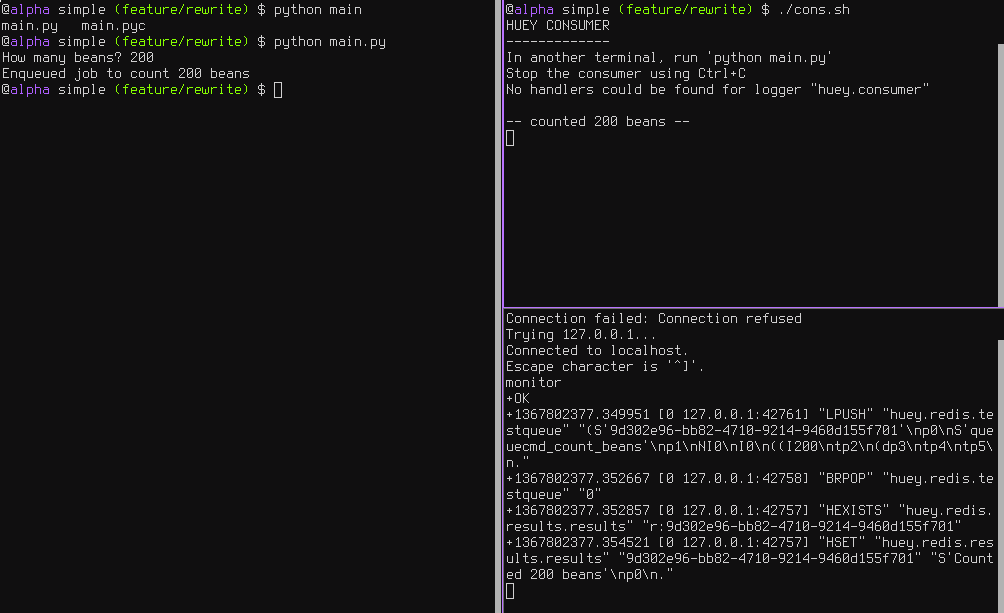
    <content type="html"><![CDATA[<h1 id="Huey"><a href="#Huey" class="headerlink" title="Huey"></a>Huey</h1><h2 id="简介"><a href="#简介" class="headerlink" title="简介"></a>简介</h2><h3 id="一个轻量级备选库"><a href="#一个轻量级备选库" class="headerlink" title="一个轻量级备选库"></a>一个轻量级备选库</h3><ul><li>使用 python 编写</li><li>唯一依赖 <code>Python Redis client</code></li></ul><h3 id="支持"><a href="#支持" class="headerlink" title="支持"></a>支持</h3><ul><li>多进程, 多线程或者 <a href="https://greenlet.readthedocs.io/en/latest/" target="_blank" rel="external"><code>greenlet task</code></a> 任务模型</li><li>可在指定时间或者延迟后执行的计划任务</li><li>像<code>crontab</code>一样定期重复执行</li><li>自动重试失败任务</li><li>存储任务结果</li></ul><h2 id="安装"><a href="#安装" class="headerlink" title="安装"></a>安装</h2><p>pip </p><figure class="highlight sh"><table><tr><td class="code"><pre><div class="line">$ pip install huey</div></pre></td></tr></table></figure><p>安装并自动启动数据库 <code>SQLite/Redis</code><backend>支持</backend></p><figure class="highlight sh"><table><tr><td class="code"><pre><div class="line">$ pip install huey[backends]</div></pre></td></tr></table></figure><p>除了标准库依赖外, 只需要 <code>redis</code></p><figure class="highlight sh"><table><tr><td class="code"><pre><div class="line">$ pip install redis</div></pre></td></tr></table></figure><p>如果你的任务是 <code>IO密集型</code> 而不是 <code>CPU密集型</code> <a href="http://blog.csdn.net/q_l_s/article/details/51538039" target="_blank" rel="external">参考IO/CPU bound</a>, 那么可以考虑使用 <code>greenlet</code> 工作类型. </p><figure class="highlight sh"><table><tr><td class="code"><pre><div class="line">$ pip install gevent</div></pre></td></tr></table></figure><p>使用 git 安装最新版本</p><figure class="highlight sh"><table><tr><td class="code"><pre><div class="line">$ git <span class="built_in">clone</span> https://github.com/coleifer/huey.git</div><div class="line">$ <span class="built_in">cd</span> huey</div><div class="line">$ python setup.py install</div></pre></td></tr></table></figure><h2 id="开始使用"><a href="#开始使用" class="headerlink" title="开始使用"></a>开始使用</h2><h3 id="向导"><a href="#向导" class="headerlink" title="向导"></a>向导</h3><p>使用<code>huey</code>需要注意以下3点</p><ul><li>生产者<code>the produces(s)</code> : i.e. web应用 </li><li>消费者<code>the consumer(s)</code> </li><li>任务队列存储<code>queue</code> : e.g. Redis</li></ul><p><img src="/20171213/python/tlibs/huey/intro.png" alt="intro"></p><p>如图所示的这三个进程</p><p>左侧是生产者, 右上是消费者, 右下是队列</p><h3 id="建议代码目录结构"><a href="#建议代码目录结构" class="headerlink" title="建议代码目录结构"></a><code>建议</code>代码目录结构</h3><figure class="highlight sh"><table><tr><td class="code"><pre><div class="line">.</div><div class="line">├── __init__.py</div><div class="line">├── app.py<span class="comment"># producer 生产者</span></div><div class="line">├── config.py<span class="comment"># 队列存储配置文件</span></div><div class="line">└── tasks.py<span class="comment"># 任务, 消费者</span></div></pre></td></tr></table></figure><p>首先是配置你的任务队列. 消费者需要一个指明所用后端<code>Huey实例</code></p><figure class="highlight python"><table><tr><td class="code"><pre><div class="line"><span class="comment"># config.py</span></div><div class="line"><span class="keyword">from</span> huey <span class="keyword">import</span> RedisHuey</div><div class="line"></div><div class="line">huey = RedisHuey()</div></pre></td></tr></table></figure><p><code>huey</code>对象封装了队列, 而这个队列用来负责存储和收取信息, 你的应用代码中的<code>huey</code>实例使用了后端来协调函数调用. </p><figure class="highlight python"><table><tr><td class="code"><pre><div class="line"><span class="comment"># tasks.py</span></div><div class="line"><span class="keyword">from</span> config <span class="keyword">import</span> huey <span class="comment"># import the huey we instantiated in config.py</span></div><div class="line"></div><div class="line"></div><div class="line"><span class="comment"># 通过装饰器, 可以简单的实现 消费者消费 功能</span></div><div class="line"><span class="meta">@huey.task()</span></div><div class="line"><span class="function"><span class="keyword">def</span> <span class="title">count_beans</span><span class="params">(num)</span>:</span></div><div class="line">    print(<span class="string">'-- counted %s beans --'</span> % num)</div></pre></td></tr></table></figure><p>上述例子说明了实现<code>消费者</code>的最简方法, 通过<code>装饰器</code>. 当<code>count_beans</code>被 <code>main</code>调用时, 只要<code>enqueueing</code>完成对函数的调用后会立即返回,而不是等待<code>count_beans</code>的执行结果,无论<code>count_beans</code>是否有耗时操作.</p><p>我们的主执行程序很简单, 只需要导入配置和任务即可. 这是为了确保当我们在通过指向配置运行<code>consumer</code>时, 任务也被导入并加载到了内存中.</p><figure class="highlight python"><table><tr><td class="code"><pre><div class="line"><span class="comment"># main.py</span></div><div class="line"><span class="keyword">from</span> config <span class="keyword">import</span> huey  <span class="comment"># import our "huey" object 需要保证导入名字为 huey, 否则会报错</span></div><div class="line"><span class="keyword">from</span> tasks <span class="keyword">import</span> count_beans  <span class="comment"># import our task</span></div><div class="line"></div><div class="line"></div><div class="line"><span class="keyword">if</span> __name__ == <span class="string">'__main__'</span>:</div><div class="line">    beans = raw_input(<span class="string">'How many beans? '</span>)</div><div class="line">    count_beans(int(beans))</div><div class="line">    print(<span class="string">'Enqueued job to count %s beans'</span> % beans)</div></pre></td></tr></table></figure><h3 id="运行测试"><a href="#运行测试" class="headerlink" title="运行测试"></a>运行测试</h3><ul><li>注意:<code>main.huey</code>表示 <code>main.py</code> 中导入 的 <code>huey 实例</code></li><li>如果 <code>from config import huey as mmhuey</code>, 则运行脚本是 <code>huey_consumer.py main.mmhuey</code></li></ul><figure class="highlight sh"><table><tr><td class="code"><pre><div class="line"><span class="comment"># 消费者, 消费队列 </span></div><div class="line">huey_consumer.py main.huey</div><div class="line"></div><div class="line"><span class="comment"># 生产者, 压入队列</span></div><div class="line">python main.py</div></pre></td></tr></table></figure><h3 id="任务结果"><a href="#任务结果" class="headerlink" title="任务结果"></a>任务结果</h3><p>上述任务描述了 <code>只发不收</code> 的场景, 但是如果你需要任务的返回结果呢? 为了获取结果, 你只需要在你的任务中返回即可.</p><blockquote><p>注意: 存储结果会浪费大量空间, 如果结果不是必须, 请返回为 None, 或者在 <code>Huey</code>实例中设置 <code>result_store=False</code></p></blockquote><figure class="highlight python"><table><tr><td class="code"><pre><div class="line"><span class="comment"># tasks.py</span></div><div class="line"><span class="keyword">from</span> config <span class="keyword">import</span> huey</div><div class="line"></div><div class="line"></div><div class="line"><span class="meta">@huey.task()</span></div><div class="line"><span class="function"><span class="keyword">def</span> <span class="title">count_beans</span><span class="params">(num)</span>:</span></div><div class="line">    print(<span class="string">'-- counted %s beans --'</span> % num)</div><div class="line">    <span class="keyword">return</span> <span class="string">'Counted %s beans'</span> % num</div></pre></td></tr></table></figure><figure class="highlight python"><table><tr><td class="code"><pre><div class="line"><span class="comment"># main.py</span></div><div class="line"><span class="keyword">from</span> config <span class="keyword">import</span> huey  <span class="comment"># import our "huey" object 需要保证导入名字为 huey, 否则会报错</span></div><div class="line"><span class="keyword">from</span> tasks <span class="keyword">import</span> count_beans  <span class="comment"># import our task</span></div><div class="line"></div><div class="line"></div><div class="line"><span class="keyword">if</span> __name__ == <span class="string">'__main__'</span>:</div><div class="line">    beans = raw_input(<span class="string">'How many beans? '</span>)</div><div class="line">    rs = count_beans(int(beans))</div><div class="line">    print(<span class="string">'Enqueued job to count %s beans'</span> % beans)</div><div class="line">    print(rs()) <span class="comment"># 由于使用异步队列, 故与使用显示调用的 rs.get() 一样都是 None</span></div><div class="line">    <span class="comment"># 如果需要获取结果 需要使用 rs(blocking=True)</span></div></pre></td></tr></table></figure><h3 id="在将来某个时刻运行"><a href="#在将来某个时刻运行" class="headerlink" title="在将来某个时刻运行"></a>在将来某个时刻运行</h3><blockquote><p>需要在 main 中调用时, 启用 schedule 来实现</p></blockquote><figure class="highlight python"><table><tr><td class="code"><pre><div class="line"><span class="comment"># main.py</span></div><div class="line"><span class="comment"># 建立1个10s后执行的任务</span></div><div class="line">count_beans.schedule(args=(<span class="number">100</span>,), delay=<span class="number">10</span>)</div><div class="line"></div><div class="line"><span class="comment"># 建立一个 60s 后运行的任务</span></div><div class="line">count_beans.schedule(args=(<span class="number">100</span>,),</div><div class="line">                     eta=datetime.datetime.now() + datetime.timedelta(seconds=<span class="number">60</span>))</div></pre></td></tr></table></figure><h3 id="失败重试机制"><a href="#失败重试机制" class="headerlink" title="失败重试机制"></a>失败重试机制</h3><blockquote><p>直接在 tasks 中使用装饰器</p></blockquote><figure class="highlight python"><table><tr><td class="code"><pre><div class="line"><span class="comment"># tasks.py</span></div><div class="line"><span class="meta">@huey.task(retries=3)</span></div><div class="line"><span class="function"><span class="keyword">def</span> <span class="title">try_thrice</span><span class="params">()</span>:</span></div><div class="line">    print(<span class="string">'trying....'</span>)</div><div class="line">    <span class="keyword">raise</span> Exception(<span class="string">'nope'</span>)</div></pre></td></tr></table></figure><h3 id="计划执行任务"><a href="#计划执行任务" class="headerlink" title="计划执行任务"></a>计划执行任务</h3><blockquote><p>使用 crontab 来实现.</p></blockquote><figure class="highlight python"><table><tr><td class="code"><pre><div class="line"><span class="comment"># tasks.py</span></div><div class="line"><span class="keyword">from</span> datetime <span class="keyword">import</span> datetime</div><div class="line"><span class="keyword">from</span> huey <span class="keyword">import</span> crontab</div><div class="line"></div><div class="line"><span class="keyword">from</span> config <span class="keyword">import</span> huey</div><div class="line"></div><div class="line"><span class="meta">@huey.periodic_task(crontab(minute='*'))</span></div><div class="line"><span class="function"><span class="keyword">def</span> <span class="title">print_time</span><span class="params">()</span>:</span></div><div class="line">    print(datetime.now())</div></pre></td></tr></table></figure><h3 id="取消-暂停任务"><a href="#取消-暂停任务" class="headerlink" title="取消/暂停任务"></a>取消/暂停任务</h3><h4 id="普通任务"><a href="#普通任务" class="headerlink" title="普通任务"></a>普通任务</h4><blockquote><p>取消单个实例</p></blockquote><figure class="highlight python"><table><tr><td class="code"><pre><div class="line">res = count_beans(<span class="number">1024</span>)</div><div class="line"><span class="comment"># 取消,尚未执行的任务</span></div><div class="line">res.revoke()</div><div class="line"><span class="comment"># 当然也可以重新恢复</span></div><div class="line">res.restore()</div></pre></td></tr></table></figure><blockquote><p>取消给定任务的所有实例</p></blockquote><figure class="highlight python"><table><tr><td class="code"><pre><div class="line"><span class="comment"># 撤消</span></div><div class="line">count_beans.revoke()</div><div class="line"><span class="comment"># 恢复</span></div><div class="line">count_beans.restore()</div></pre></td></tr></table></figure><h4 id="定期任务"><a href="#定期任务" class="headerlink" title="定期任务"></a>定期任务</h4><figure class="highlight python"><table><tr><td class="code"><pre><div class="line"><span class="meta">@huey.periodic_task(crontab(minute='*'))</span></div><div class="line"><span class="function"><span class="keyword">def</span> <span class="title">print_time</span><span class="params">()</span>:</span></div><div class="line">    print(datetime.now())</div></pre></td></tr></table></figure><blockquote><p>停止一次</p></blockquote><figure class="highlight python"><table><tr><td class="code"><pre><div class="line">print_time.revoke(revoke_once=<span class="keyword">True</span>)</div></pre></td></tr></table></figure><blockquote><p>停止到直到某个时间</p></blockquote><figure class="highlight python"><table><tr><td class="code"><pre><div class="line"><span class="comment"># prevent printing time for 10 minutes</span></div><div class="line">now = datetime.datetime.utcnow()</div><div class="line">in_10 = now + datetime.timedelta(seconds=<span class="number">600</span>)</div><div class="line"></div><div class="line">print_time.revoke(revoke_until=in_10)</div></pre></td></tr></table></figure><blockquote><p>永远停止</p></blockquote><figure class="highlight python"><table><tr><td class="code"><pre><div class="line">print_time.revoke()</div></pre></td></tr></table></figure><blockquote><p>随时恢复</p></blockquote><figure class="highlight python"><table><tr><td class="code"><pre><div class="line">print_time.restore()</div></pre></td></tr></table></figure>]]></content>
    
    <summary type="html">


        &lt;h1 id=&quot;Huey&quot;&gt;&lt;a href=&quot;#Huey&quot; class=&quot;headerlink&quot; title=&quot;Huey&quot;&gt;&lt;/a&gt;Huey&lt;/h1&gt;&lt;h2 id=&quot;简介&quot;&gt;&lt;a href=&quot;#简介&quot; class=&quot;headerlink&quot; title=&quot;简介&quot;&gt;&lt;/a&gt;简介&lt;/h
      
    
    </summary>
    
      <category term="python" scheme="http://doequitable.com/categories/python/"/>
    
    
      <category term="python" scheme="http://doequitable.com/tags/python/"/>
    
      <category term="huey" scheme="http://doequitable.com/tags/huey/"/>
    
      <category term="队列" scheme="http://doequitable.com/tags/%E9%98%9F%E5%88%97/"/>
    
  </entry>
  
  <entry>
    <title>hot-redis</title>
    <link href="http://doequitable.com/20171208/python/tlibs/hot-redis/"/>
    <id>http://doequitable.com/20171208/python/tlibs/hot-redis/</id>
    <published>2017-12-07T16:00:00.000Z</published>
    <updated>2017-12-13T03:18:19.073Z</updated>
    
    <content type="html"><![CDATA[<h1 id="hot-redis"><a href="#hot-redis" class="headerlink" title="hot-redis"></a>hot-redis</h1><ul><li><a href="https://github.com/stephenmcd/hot-redis" target="_blank" rel="external">github</a></li></ul><ul><li>开发者: <a href="http://twitter.com/stephen_mcd" target="_blank" rel="external">Stephen McDonald</a></li></ul><h2 id="简介"><a href="#简介" class="headerlink" title="简介"></a>简介</h2><blockquote><p><code>HOT Redis</code>是<code>redis-py</code>的封装库. 它不需要使用<code>Redis</code>_指令直接操作客户端. 它模拟了 <code>python</code>内置的如 <code>lists, dicts, sets</code>等数据类型, 以及<code>Queue, threading和collections等模块</code>提供的<code>标准库类</code>复杂结构类型,  只需要操作这些类型便可以进行redis操作</p><p>这些类型都由 Redis 支持, 可以在网络上进行<code>原子操作</code> – 关于对象的<code>原子操作</code>是<code>HOT redis</code>一个核心功能, 而这些都是由在 Redis 内部运行的 <code>Lua</code>_脚本来提供支持, 用于确保原子操作正常工作. </p></blockquote><a id="more"></a><h2 id="安装"><a href="#安装" class="headerlink" title="安装"></a>安装</h2><figure class="highlight sh"><table><tr><td class="code"><pre><div class="line">pip install -U hot-redis</div></pre></td></tr></table></figure><h2 id="使用"><a href="#使用" class="headerlink" title="使用"></a>使用</h2><h3 id="入门-单机新建"><a href="#入门-单机新建" class="headerlink" title="入门: 单机新建"></a>入门: 单机新建</h3><blockquote><p>HOT Redis 提供的任何一个类型, 都被尽量按照 python 内置类型来设计</p><p>最大的不同在于 <code>__init__</code> 方法, HOT Redis 的<code>__init__</code> 方法可以接受一个初始值, 用来定义并初始化存储于Redis中的对象, 你需要指定一个 <code>key</code>, 当然也可以使用自动生成的 key, key 可以通过<code>key</code>属性来访问</p></blockquote><figure class="highlight sh"><table><tr><td class="code"><pre><div class="line">&gt;&gt;&gt; from hot_redis import List</div><div class="line">&gt;&gt;&gt; my_list = List()</div><div class="line">&gt;&gt;&gt; my_list.key</div><div class="line"><span class="string">'93366bdb-90b2-4226-a52a-556f678af40e'</span></div><div class="line">&gt;&gt;&gt; my_list_with_key = List(key=<span class="string">"foo"</span>)</div><div class="line">&gt;&gt;&gt; my_list_with_key.key</div><div class="line"><span class="string">'foo'</span></div></pre></td></tr></table></figure><h3 id="提高-多机交互"><a href="#提高-多机交互" class="headerlink" title="提高: 多机交互"></a>提高: 多机交互</h3><h4 id="步骤1-电脑A"><a href="#步骤1-电脑A" class="headerlink" title="步骤1: 电脑A"></a>步骤1: 电脑A</h4><figure class="highlight sh"><table><tr><td class="code"><pre><div class="line"><span class="comment"># A 初始化</span></div><div class="line">&gt;&gt;&gt; list_on_computer_a = List(key=<span class="string">"foo"</span>, initial=[<span class="string">"a"</span>, <span class="string">"b"</span>, <span class="string">"c"</span>])</div></pre></td></tr></table></figure><h4 id="步骤2-电脑B"><a href="#步骤2-电脑B" class="headerlink" title="步骤2: 电脑B"></a>步骤2: 电脑B</h4><figure class="highlight sh"><table><tr><td class="code"><pre><div class="line">&gt;&gt;&gt; list_on_computer_b = List(key=<span class="string">"foo"</span>)</div><div class="line">&gt;&gt;&gt; list_on_computer_b[:]  <span class="comment"># 命令等同于: LRANGE foo 0 -1</span></div><div class="line">[<span class="string">'a'</span>, <span class="string">'b'</span>, <span class="string">'c'</span>]</div><div class="line">&gt;&gt;&gt; list_on_computer_b += [<span class="string">'d'</span>, <span class="string">'e'</span>, <span class="string">'f'</span>]  <span class="comment"># 命令等同于: RPUSH foo d e f</span></div></pre></td></tr></table></figure><h4 id="步骤3-电脑A"><a href="#步骤3-电脑A" class="headerlink" title="步骤3: 电脑A"></a>步骤3: 电脑A</h4><figure class="highlight sh"><table><tr><td class="code"><pre><div class="line"> &gt;&gt;&gt; list_on_computer_a[:]</div><div class="line">[<span class="string">'a'</span>, <span class="string">'b'</span>, <span class="string">'c'</span>, <span class="string">'d'</span>, <span class="string">'e'</span>, <span class="string">'f'</span>]</div><div class="line">&gt;&gt;&gt; <span class="string">'c'</span> <span class="keyword">in</span> list_on_computer_a  <span class="comment"># 可以像 python 内置 list 一样使用</span></div><div class="line">True</div><div class="line">&gt;&gt;&gt; list_on_computer_a.reverse()</div><div class="line">&gt;&gt;&gt; list_on_computer_a[:]</div><div class="line">[<span class="string">'f'</span>, <span class="string">'e'</span>, <span class="string">'d'</span>, <span class="string">'c'</span>, <span class="string">'b'</span>, <span class="string">'a'</span>]</div></pre></td></tr></table></figure><h3 id="配置"><a href="#配置" class="headerlink" title="配置"></a>配置</h3><blockquote><p>默认情况下, HOT Redis 连接本机的<code>6379</code>端口</p></blockquote><h4 id="全局配置-所有对象使用同一配置"><a href="#全局配置-所有对象使用同一配置" class="headerlink" title="全局配置: 所有对象使用同一配置"></a>全局配置: 所有对象使用同一配置</h4><blockquote><p>你可以在实例化 <code>所有HOT Redis对象</code>之前, 通过 <code>hot_redis.configure</code> 来指定连接的 <code>HOST,PORT</code>及其他授权信息</p></blockquote><figure class="highlight sh"><table><tr><td class="code"><pre><div class="line">&gt;&gt;&gt; from hot_redis import configure</div><div class="line">&gt;&gt;&gt; configure(host=<span class="string">'myremotehost'</span>, port=6380)</div></pre></td></tr></table></figure><h4 id="单一配置-为每一对象指定配置"><a href="#单一配置-为每一对象指定配置" class="headerlink" title="单一配置: 为每一对象指定配置"></a>单一配置: 为每一对象指定配置</h4><blockquote><p>通过显式使用 <code>HotClient</code> 来创建, 并为每一对象指定 <code>HotClient</code></p></blockquote><figure class="highlight sh"><table><tr><td class="code"><pre><div class="line">&gt;&gt;&gt; from hot_redis import HotClient, Queue</div><div class="line">&gt;&gt;&gt; client = HotClient(host=<span class="string">"myremotehost"</span>, port=6380)</div><div class="line">&gt;&gt;&gt; my_queue = Queue(client=client)</div></pre></td></tr></table></figure><h3 id="事务支持"><a href="#事务支持" class="headerlink" title="事务支持"></a>事务支持</h3><blockquote><p>由<code>MULTI和EXEC</code>指令来提供线程安全的事务支持</p></blockquote><figure class="highlight sh"><table><tr><td class="code"><pre><div class="line">&gt;&gt;&gt; from hot_redis import List, Queue, transaction</div><div class="line">&gt;&gt;&gt; my_list = List(key=<span class="string">"foo"</span>)</div><div class="line">&gt;&gt;&gt; my_queue = Queue(key=<span class="string">"bar"</span>)</div><div class="line">&gt;&gt;&gt; with transaction():</div><div class="line">...     <span class="keyword">for</span> i <span class="keyword">in</span> range(20):</div><div class="line">...         my_list.append(i)</div><div class="line">...         my_queue.put(i)</div><div class="line"></div><div class="line"><span class="comment"># 其中所有的 append, put 会被合并到一条指令, 在事务上下文退出时, 一次执行</span></div></pre></td></tr></table></figure><h3 id="数据类型"><a href="#数据类型" class="headerlink" title="数据类型"></a>数据类型</h3><blockquote><p>HOT Redis 类型与 Python 类型的对应关系</p></blockquote><table><thead><tr><th>HOT Redis</th><th>Python</th><th>Redis</th></tr></thead><tbody><tr><td>List</td><td>list</td><td>list</td></tr><tr><td>Set</td><td>set</td><td>set</td></tr><tr><td>Dict</td><td>dict</td><td>hash</td></tr><tr><td>String</td><td>string</td><td>string</td></tr><tr><td>ImmutableString</td><td>string</td><td>string</td></tr><tr><td>Int</td><td>int</td><td>int</td></tr><tr><td>Float</td><td>float</td><td>float</td></tr><tr><td>Queue</td><td>Queue.Queue</td><td>list</td></tr><tr><td>LifoQueue</td><td>Queue.LifoQueue</td><td>list</td></tr><tr><td>SetQueue</td><td>N/A</td><td>list + set</td></tr><tr><td>LifoSetQueue</td><td>N/A</td><td>list + set</td></tr><tr><td>BoundedSemaphore</td><td>threading.BoundedSemaphore</td><td>list</td></tr><tr><td>Semaphore</td><td>threading.Semaphore</td><td>list</td></tr><tr><td>Lock</td><td>threading.Lock</td><td>list</td></tr><tr><td>RLock</td><td>threading.RLock</td><td>list</td></tr><tr><td>DefaultDict</td><td>collections.DefaultDict</td><td>hash</td></tr><tr><td>MultiSet</td><td>collections.Counter</td><td>hash</td></tr></tbody></table><h3 id="样例代码"><a href="#样例代码" class="headerlink" title="样例代码"></a>样例代码</h3><blockquote><p>环境: python 3.6</p></blockquote><figure class="highlight python"><table><tr><td class="code"><pre><div class="line"><span class="comment"># redis 连接配置</span></div><div class="line">redis_conf = &#123;</div><div class="line">  <span class="string">'host'</span>: <span class="string">'localhost'</span>,</div><div class="line">  <span class="string">'port'</span>: <span class="number">6379</span>,</div><div class="line">  <span class="string">'password'</span>: <span class="string">'123456'</span>,</div><div class="line">  <span class="string">'socket_timeout'</span>: <span class="number">3</span>,</div><div class="line">  <span class="string">'socket_connect_timeout'</span>: <span class="number">3</span>,</div><div class="line">  <span class="string">'db'</span>: <span class="number">0</span>,</div><div class="line">&#125;</div><div class="line"></div><div class="line"><span class="function"><span class="keyword">def</span> <span class="title">hot_redis_test</span><span class="params">()</span>:</span></div><div class="line">    <span class="string">"""</span></div><div class="line"><span class="string">        测试 hot redis 常用功能</span></div><div class="line"><span class="string">    :return:</span></div><div class="line"><span class="string">    """</span></div><div class="line">    <span class="keyword">import</span> hot_redis <span class="keyword">as</span> rds</div><div class="line">    <span class="keyword">import</span> redis</div><div class="line"></div><div class="line">    rdb_out = rds.HotClient(**redis_conf)</div><div class="line"></div><div class="line">    rd = redis.StrictRedis(**redis_conf)</div><div class="line">    clear = <span class="keyword">True</span></div><div class="line">    dat = &#123;</div><div class="line">        <span class="string">'base'</span>: <span class="number">10</span>,</div><div class="line">        <span class="string">'crx'</span>: <span class="number">2</span>,</div><div class="line">        <span class="string">'jobbole'</span>: <span class="number">1</span>,</div><div class="line">    &#125;</div><div class="line"></div><div class="line">    <span class="comment"># 初始化一个字典</span></div><div class="line">    _dict = rds.Dict(client=rdb_out, key=<span class="string">'ig.dict'</span>)</div><div class="line">    <span class="comment"># 更新, 自动写入 redis</span></div><div class="line">    _dict[<span class="string">'fns'</span>] = dat</div><div class="line"></div><div class="line">    <span class="comment"># 删除字典</span></div><div class="line">    <span class="keyword">if</span> clear:</div><div class="line">        _dict.clear()</div><div class="line"></div><div class="line">    <span class="comment"># 测试 list</span></div><div class="line">    _list = rds.List(client=rdb_out, key=<span class="string">'ig.list'</span>)</div><div class="line">    _list += list(dat.keys())</div><div class="line"></div><div class="line">    <span class="keyword">if</span> clear:</div><div class="line">        <span class="keyword">for</span> i <span class="keyword">in</span> range(len(_list)):</div><div class="line">            _list.pop()</div><div class="line"></div><div class="line">    _string = rds.String(client=rdb_out,</div><div class="line">                         key=<span class="string">'ig.string'</span>,</div><div class="line">                         initial=<span class="string">','</span>.join([str(_) <span class="keyword">for</span> _ <span class="keyword">in</span> dat.keys()])</div><div class="line">                         )</div><div class="line">    <span class="keyword">if</span> clear:</div><div class="line">        rd.delete(<span class="string">'ig.string'</span>)</div></pre></td></tr></table></figure><h3 id="链接"><a href="#链接" class="headerlink" title="链接"></a>链接</h3><ul><li><a href="https://github.com/andymccurdy/redis-py" target="_blank" rel="external"><code>redis-py</code></a></li><li><a href="http://redis.io" target="_blank" rel="external"><code>Redis</code></a></li><li><a href="http://www.lua.org/" target="_blank" rel="external"><code>Lua</code></a></li><li><a href="https://kouio.com" target="_blank" rel="external"><code>Kouio RSS reader</code></a></li><li><a href="http://www.pip-installer.org/" target="_blank" rel="external"><code>pip</code></a></li><li><a href="http://blog.jupo.org/2013/06/12/bitwise-lua-operations-in-redis/" target="_blank" rel="external"><code>Bitwise Lua Operations in Redis</code></a></li></ul>]]></content>
    
    <summary type="html">
    
      &lt;h1 id=&quot;hot-redis&quot;&gt;&lt;a href=&quot;#hot-redis&quot; class=&quot;headerlink&quot; title=&quot;hot-redis&quot;&gt;&lt;/a&gt;hot-redis&lt;/h1&gt;&lt;ul&gt;
&lt;li&gt;&lt;a href=&quot;https://github.com/stephenmcd/hot-redis&quot; target=&quot;_blank&quot; rel=&quot;external&quot;&gt;github&lt;/a&gt;&lt;/li&gt;
&lt;/ul&gt;
&lt;ul&gt;
&lt;li&gt;开发者: &lt;a href=&quot;http://twitter.com/stephen_mcd&quot; target=&quot;_blank&quot; rel=&quot;external&quot;&gt;Stephen McDonald&lt;/a&gt;&lt;/li&gt;
&lt;/ul&gt;
&lt;h2 id=&quot;简介&quot;&gt;&lt;a href=&quot;#简介&quot; class=&quot;headerlink&quot; title=&quot;简介&quot;&gt;&lt;/a&gt;简介&lt;/h2&gt;&lt;blockquote&gt;
&lt;p&gt;&lt;code&gt;HOT Redis&lt;/code&gt;是&lt;code&gt;redis-py&lt;/code&gt;的封装库. 它不需要使用&lt;code&gt;Redis&lt;/code&gt;_指令直接操作客户端. 它模拟了 &lt;code&gt;python&lt;/code&gt;内置的如 &lt;code&gt;lists, dicts, sets&lt;/code&gt;等数据类型, 以及&lt;code&gt;Queue, threading和collections等模块&lt;/code&gt;提供的&lt;code&gt;标准库类&lt;/code&gt;复杂结构类型,  只需要操作这些类型便可以进行redis操作&lt;/p&gt;
&lt;p&gt;这些类型都由 Redis 支持, 可以在网络上进行&lt;code&gt;原子操作&lt;/code&gt; – 关于对象的&lt;code&gt;原子操作&lt;/code&gt;是&lt;code&gt;HOT redis&lt;/code&gt;一个核心功能, 而这些都是由在 Redis 内部运行的 &lt;code&gt;Lua&lt;/code&gt;_脚本来提供支持, 用于确保原子操作正常工作. &lt;/p&gt;
&lt;/blockquote&gt;
    
    </summary>
    
      <category term="python" scheme="http://doequitable.com/categories/python/"/>
    
    
      <category term="python" scheme="http://doequitable.com/tags/python/"/>
    
      <category term="redis" scheme="http://doequitable.com/tags/redis/"/>
    
  </entry>
  
  <entry>
    <title>index page</title>
    <link href="http://doequitable.com/20171018/luoo.net/index/"/>
    <id>http://doequitable.com/20171018/luoo.net/index/</id>
    <published>2017-10-17T16:00:00.000Z</published>
    <updated>2017-12-20T06:43:53.373Z</updated>
    
    <content type="html"><![CDATA[<h1 id="落网音乐"><a href="#落网音乐" class="headerlink" title="落网音乐"></a>落网音乐</h1><h2 id="思路"><a href="#思路" class="headerlink" title="思路"></a>思路</h2><ul><li>[ ] <del>直接注册使用其API</del></li><li>[x] 爬取页面, 存储于数据库, 自我维护API</li><li>[x] mongo 数据库</li></ul><h2 id="步骤"><a href="#步骤" class="headerlink" title="步骤"></a>步骤</h2><ul><li>[x] 爬取, 解析获取相关资源</li><li>[x] API生成入库</li><li>[x] 调用</li></ul><h2 id="资源"><a href="#资源" class="headerlink" title="资源"></a>资源</h2><ul><li>[x] 期刊</li><li>[x] 单曲</li><li>[x] 专栏</li></ul><h2 id="期刊"><a href="#期刊" class="headerlink" title="期刊"></a>期刊</h2><ul><li>[x] 类别</li></ul><ul><li>[x] 总数/分布信息</li><li>[x] 热门期刊</li></ul><ul><li>[x] 单个详情</li></ul><a id="more"></a><h3 id="期刊分类-periodical-classify"><a href="#期刊分类-periodical-classify" class="headerlink" title="期刊分类 periodical classify"></a>期刊分类 <code>periodical classify</code></h3><h3 id="期刊简报-periodical-count"><a href="#期刊简报-periodical-count" class="headerlink" title="期刊简报 periodical count"></a>期刊简报 <code>periodical count</code></h3><h3 id="期刊详情-periodical-detail"><a href="#期刊详情-periodical-detail" class="headerlink" title="期刊详情 periodical detail"></a>期刊详情 <code>periodical detail</code></h3><ul><li>[x] 期刊标签分类</li></ul><ul><li>[x] 图片, 文字等介绍信息</li><li>[x] 歌曲列表</li></ul><h2 id="歌曲"><a href="#歌曲" class="headerlink" title="歌曲"></a>歌曲</h2><h2 id="专栏"><a href="#专栏" class="headerlink" title="专栏"></a>专栏</h2><h2 id="mongodb"><a href="#mongodb" class="headerlink" title="mongodb"></a>mongodb</h2><h3 id="下载安装-docker"><a href="#下载安装-docker" class="headerlink" title="下载安装 docker"></a>下载安装 docker</h3><ul><li><a href="https://store.docker.com/editions/community/docker-ce-desktop-mac" target="_blank" rel="external">下载MAC版本</a></li><li>安装</li></ul><h3 id="docker-实例"><a href="#docker-实例" class="headerlink" title="docker 实例"></a>docker 实例</h3><figure class="highlight plain"><table><tr><td class="code"><pre><div class="line">docker run --name luoo_mg \</div><div class="line">-v /Users/lihe/Documents/Luoo/db/data:/data/db \</div><div class="line">-p 27027:27017 \</div><div class="line">-d mongo:latest --smallfiles</div></pre></td></tr></table></figure>]]></content>
    
    <summary type="html">
    
      &lt;h1 id=&quot;落网音乐&quot;&gt;&lt;a href=&quot;#落网音乐&quot; class=&quot;headerlink&quot; title=&quot;落网音乐&quot;&gt;&lt;/a&gt;落网音乐&lt;/h1&gt;&lt;h2 id=&quot;思路&quot;&gt;&lt;a href=&quot;#思路&quot; class=&quot;headerlink&quot; title=&quot;思路&quot;&gt;&lt;/a&gt;思路&lt;/h2&gt;&lt;ul&gt;
&lt;li&gt;[ ] &lt;del&gt;直接注册使用其API&lt;/del&gt;&lt;/li&gt;
&lt;li&gt;[x] 爬取页面, 存储于数据库, 自我维护API&lt;/li&gt;
&lt;li&gt;[x] mongo 数据库&lt;/li&gt;
&lt;/ul&gt;
&lt;h2 id=&quot;步骤&quot;&gt;&lt;a href=&quot;#步骤&quot; class=&quot;headerlink&quot; title=&quot;步骤&quot;&gt;&lt;/a&gt;步骤&lt;/h2&gt;&lt;ul&gt;
&lt;li&gt;[x] 爬取, 解析获取相关资源&lt;/li&gt;
&lt;li&gt;[x] API生成入库&lt;/li&gt;
&lt;li&gt;[x] 调用&lt;/li&gt;
&lt;/ul&gt;
&lt;h2 id=&quot;资源&quot;&gt;&lt;a href=&quot;#资源&quot; class=&quot;headerlink&quot; title=&quot;资源&quot;&gt;&lt;/a&gt;资源&lt;/h2&gt;&lt;ul&gt;
&lt;li&gt;[x] 期刊&lt;/li&gt;
&lt;li&gt;[x] 单曲&lt;/li&gt;
&lt;li&gt;[x] 专栏&lt;/li&gt;
&lt;/ul&gt;
&lt;h2 id=&quot;期刊&quot;&gt;&lt;a href=&quot;#期刊&quot; class=&quot;headerlink&quot; title=&quot;期刊&quot;&gt;&lt;/a&gt;期刊&lt;/h2&gt;&lt;ul&gt;
&lt;li&gt;[x] 类别&lt;/li&gt;
&lt;/ul&gt;
&lt;ul&gt;
&lt;li&gt;[x] 总数/分布信息&lt;/li&gt;
&lt;li&gt;[x] 热门期刊&lt;/li&gt;
&lt;/ul&gt;
&lt;ul&gt;
&lt;li&gt;[x] 单个详情&lt;/li&gt;
&lt;/ul&gt;
    
    </summary>
    
      <category term="luoo" scheme="http://doequitable.com/categories/luoo/"/>
    
    
      <category term="luoo" scheme="http://doequitable.com/tags/luoo/"/>
    
  </entry>
  
  <entry>
    <title>index page</title>
    <link href="http://doequitable.com/20170928/index/"/>
    <id>http://doequitable.com/20170928/index/</id>
    <published>2017-09-27T16:00:00.000Z</published>
    <updated>2017-09-28T03:25:36.000Z</updated>
    
    <summary type="html">
    
    </summary>
    
      <category term="tools" scheme="http://doequitable.com/categories/tools/"/>
    
    
  </entry>
  
  <entry>
    <title>时间复杂度</title>
    <link href="http://doequitable.com/20170925/coding/%E6%97%B6%E9%97%B4%E5%A4%8D%E6%9D%82%E5%BA%A6/"/>
    <id>http://doequitable.com/20170925/coding/时间复杂度/</id>
    <published>2017-09-24T16:00:00.000Z</published>
    <updated>2017-12-20T06:44:08.235Z</updated>
    
    <content type="html"><![CDATA[<h1 id="algorithms-时间复杂度"><a href="#algorithms-时间复杂度" class="headerlink" title="algorithms 时间复杂度"></a>algorithms 时间复杂度</h1><h2 id="参考链接"><a href="#参考链接" class="headerlink" title="参考链接"></a>参考链接</h2><ul><li><p><a href="http://blog.csdn.net/zdk930519/article/details/54137476" target="_blank" rel="external">数学公式</a></p></li><li><p><a href="http://blog.csdn.net/zolalad/article/details/11848739" target="_blank" rel="external">CSDN.zolalad</a></p></li></ul><h2 id="python-数据结构时间复杂度"><a href="#python-数据结构时间复杂度" class="headerlink" title="python 数据结构时间复杂度"></a>python 数据结构时间复杂度</h2><h3 id="列表"><a href="#列表" class="headerlink" title="列表"></a>列表</h3><table><thead><tr><th>操作</th><th>平均情况</th><th>最坏情况</th></tr></thead><tbody><tr><td>copy</td><td>O(n)</td><td>O(n)</td></tr><tr><td>append</td><td>O(1)</td><td>O(1)</td></tr><tr><td>insert</td><td>O(n)</td><td>O(n)</td></tr><tr><td>取元素 list[i]</td><td>O(1)</td><td>O(1)</td></tr><tr><td>修改元素</td><td>O(1)</td><td>O(1)</td></tr><tr><td>删除元素</td><td>O(n)</td><td>O(n)</td></tr><tr><td>遍历</td><td>O(n)</td><td>O(n)</td></tr><tr><td>取切片</td><td>O(k)</td><td>O(k)</td></tr><tr><td>删除切片</td><td>O(n)</td><td>O(n)</td></tr><tr><td>修改切片</td><td>O(n+k)</td><td>O(n+k)</td></tr><tr><td>extend</td><td>O(k)</td><td>O(k)</td></tr><tr><td>排序</td><td>O(n log n)</td><td>O(n log n)</td></tr><tr><td>列表乘法</td><td>O(nk)</td><td>O(nk)</td></tr><tr><td>x in s</td><td>O(n)</td><td></td></tr><tr><td>min(s), max(s)</td><td>O(n)</td><td></td></tr><tr><td>计算长度</td><td>O(1)</td></tr></tbody></table><a id="more"></a><h3 id="集合"><a href="#集合" class="headerlink" title="集合"></a>集合</h3><table><thead><tr><th>操作</th><th>平均情况</th><th>最坏情况</th></tr></thead><tbody><tr><td>x in s</td><td>O(1)</td><td>O(n)</td></tr><tr><td>并集 s\</td><td>t</td><td>O(len(s) + len(t))</td><td></td></tr><tr><td>交集 s&amp;t</td><td>O(min(len(s), len(t)))</td><td>O(len(s) * len(t))</td></tr><tr><td>差集 s-t</td><td>O(len(s))</td><td></td></tr><tr><td>s.difference_update(t)</td><td>O(len(t))</td><td></td></tr><tr><td>对称差集 s^t</td><td>O(len(s))</td><td>O(len(s) * len(t))</td></tr><tr><td>s.symmetric_difference_update(t)</td><td>O(len(t))</td><td>O(len(s) * len(t))</td></tr></tbody></table><blockquote><p>求差集 与 更新为差集的运算时间复杂度并不相同! <code>差集</code>是生成新的集合, <code>更新为差集</code>是将<code>t</code>中的元素从<code>s</code>移除, 因此可以根据是否需要新集合来选择合适方法</p></blockquote><h3 id="字典"><a href="#字典" class="headerlink" title="字典"></a>字典</h3><table><thead><tr><th><strong>操作</strong></th><th><strong>平均情况</strong></th><th><strong>最坏情况</strong></th></tr></thead><tbody><tr><td>copy</td><td>O(n)</td><td>O(n)</td></tr><tr><td>get</td><td>O(1)</td><td>O(n)</td></tr><tr><td>更新</td><td>O(1)</td><td>O(n)</td></tr><tr><td>删除</td><td>O(1)</td><td>O(n)</td></tr><tr><td>遍历</td><td>O(n)</td><td>O(n)</td></tr></tbody></table><h2 id="实例分析"><a href="#实例分析" class="headerlink" title="实例分析"></a>实例分析</h2><h3 id="1-O-1"><a href="#1-O-1" class="headerlink" title="1. O(1)"></a>1. O(1)</h3><ul><li>demo code</li></ul><figure class="highlight python"><table><tr><td class="code"><pre><div class="line">t = i</div><div class="line">i = j</div><div class="line">j = t</div></pre></td></tr></table></figure><ul><li><p>说明</p><blockquote><p>上述三条单个语句的频度均为<code>1</code>, 程序段的执行时间是与问题规模<code>n</code>无关的常数. 算法的时间复杂度为常数阶, 记作<code>T(n) = O(1)</code>.</p></blockquote></li></ul><ul><li><p>注意</p><blockquote><p>如果算法的执行时间不随着问题规模<code>n</code>的增加而增长, 即使算法中有上千条语句, 执行时间也不过一个较大的常数, 故此类算法的时间复杂度为<code>O(1)</code></p></blockquote></li></ul><ul><li>结论: $T(n) = O(1)$</li></ul><h3 id="2-O-n²"><a href="#2-O-n²" class="headerlink" title="2. O(n²)"></a>2. O(<strong>n²</strong>)</h3><p>$$<br>T(n) = O(n²)<br>$$</p><ul><li>demo code 1</li></ul><figure class="highlight python"><table><tr><td class="code"><pre><div class="line">sum = <span class="number">0</span><span class="comment"># 1次</span></div><div class="line">n = <span class="number">100</span><span class="comment"># 1次</span></div><div class="line"><span class="keyword">for</span> i <span class="keyword">in</span> range(n):<span class="comment"># n+1次</span></div><div class="line">  <span class="keyword">for</span> j <span class="keyword">in</span> range(n):<span class="comment"># n²次</span></div><div class="line">    sum += <span class="number">1</span><span class="comment"># n²次</span></div><div class="line">    </div><div class="line"><span class="comment"># Θ(2n²+n+1)=n²（Θ即：去低阶项，去掉常数项，去掉高阶项的常参得到），所以T(n)==O(n²)</span></div></pre></td></tr></table></figure><ul><li><p>解释</p><blockquote><p>Θ(2n²+n+1)=n²（Θ即：去低阶项，去掉常数项，去掉高阶项的常参得到），所以T(n)==O(n²)</p></blockquote><ul><li>结论: $\Theta(2n^2 + n + 1) = n^2 {\rightarrow}T(n) = O(n^2)$</li></ul></li></ul><ul><li>demo code 2</li></ul><figure class="highlight python"><table><tr><td class="code"><pre><div class="line">n = <span class="number">100</span><span class="comment"># 1</span></div><div class="line"><span class="keyword">for</span> i <span class="keyword">in</span> range(n): <span class="comment"># n</span></div><div class="line">  y += <span class="number">1</span><span class="comment"># 1</span></div><div class="line">  i += <span class="number">1</span><span class="comment"># 1</span></div><div class="line">  <span class="keyword">for</span> j <span class="keyword">in</span> range(<span class="number">2</span>*n):<span class="comment"># (n-1)*(2n+1) =&gt; 2n² -n -1</span></div><div class="line">    j += <span class="number">1</span><span class="comment"># 1</span></div><div class="line">    x += <span class="number">1</span><span class="comment"># 1</span></div></pre></td></tr></table></figure><ul><li><p>说明</p><blockquote><p>一般情况下, 只需要考虑循环体中语句的执行次数, 忽略终值判别, 控制转移等, 当由若干循环语句时, 算法的时间复杂度是由嵌套导数最多的循环语句中最内层语句的频度<code>f(n)</code>决定的</p></blockquote></li></ul><h3 id="3-O-n"><a href="#3-O-n" class="headerlink" title="3. O(n)"></a>3. O(n)</h3><ul><li>demo code</li></ul><figure class="highlight python"><table><tr><td class="code"><pre><div class="line">a = <span class="number">0</span><span class="comment"># 1</span></div><div class="line">b = <span class="number">1</span><span class="comment"># 1</span></div><div class="line">n = <span class="number">100</span><span class="comment"># 1</span></div><div class="line"><span class="keyword">for</span> i <span class="keyword">in</span> range(n):<span class="comment"># n</span></div><div class="line">  a, b = b, a<span class="comment"># 1</span></div><div class="line">  i += <span class="number">1</span><span class="comment"># 1</span></div></pre></td></tr></table></figure><ul><li>说明</li></ul><p>$$<br>T(n) = 3 + n + 2(n - 1) = 3n + 1 = O(n)<br>$$</p><h3 id="4-O-log-2n"><a href="#4-O-log-2n" class="headerlink" title="4. O($log_2n$)"></a>4. O($log_2n$)</h3><ul><li>demo code</li></ul><figure class="highlight python"><table><tr><td class="code"><pre><div class="line">i = <span class="number">1</span><span class="comment"># ①</span></div><div class="line"><span class="keyword">while</span> i &lt; n:</div><div class="line">  i = i * <span class="number">2</span><span class="comment"># ②</span></div></pre></td></tr></table></figure><ul><li><p>说明</p><blockquote><p>语句1频度为1<br>语句2为 f(n), 则 2^f(n) &lt;= n; f(n) &lt;= log~2~n<br>取最大值 f(n)=log~2~n</p></blockquote></li><li><p>结论: $T(n) = O(log_2n)$</p></li></ul><h3 id="5-O-n-3"><a href="#5-O-n-3" class="headerlink" title="5. O($n^3$)"></a>5. O($n^3$)</h3><ul><li>demo code</li></ul><figure class="highlight python"><table><tr><td class="code"><pre><div class="line"><span class="keyword">for</span> i <span class="keyword">in</span> range(n):</div><div class="line">  i += <span class="number">1</span></div><div class="line">  <span class="keyword">for</span> j <span class="keyword">in</span> range(i):</div><div class="line">    j += <span class="number">1</span></div><div class="line">    <span class="keyword">for</span> k <span class="keyword">in</span> range(j):</div><div class="line">      k += <span class="number">1</span></div><div class="line">      x += <span class="number">1</span></div></pre></td></tr></table></figure><ul><li><p>说明</p><blockquote><p>简单可以认为<code>循环次数</code>代表了时间复杂度 <code>O(n³)</code></p></blockquote></li></ul>]]></content>
    
    <summary type="html">
    
      &lt;h1 id=&quot;algorithms-时间复杂度&quot;&gt;&lt;a href=&quot;#algorithms-时间复杂度&quot; class=&quot;headerlink&quot; title=&quot;algorithms 时间复杂度&quot;&gt;&lt;/a&gt;algorithms 时间复杂度&lt;/h1&gt;&lt;h2 id=&quot;参考链接&quot;&gt;&lt;a href=&quot;#参考链接&quot; class=&quot;headerlink&quot; title=&quot;参考链接&quot;&gt;&lt;/a&gt;参考链接&lt;/h2&gt;&lt;ul&gt;
&lt;li&gt;&lt;p&gt;&lt;a href=&quot;http://blog.csdn.net/zdk930519/article/details/54137476&quot; target=&quot;_blank&quot; rel=&quot;external&quot;&gt;数学公式&lt;/a&gt;&lt;/p&gt;
&lt;/li&gt;
&lt;li&gt;&lt;p&gt;&lt;a href=&quot;http://blog.csdn.net/zolalad/article/details/11848739&quot; target=&quot;_blank&quot; rel=&quot;external&quot;&gt;CSDN.zolalad&lt;/a&gt;&lt;/p&gt;
&lt;/li&gt;
&lt;/ul&gt;
&lt;h2 id=&quot;python-数据结构时间复杂度&quot;&gt;&lt;a href=&quot;#python-数据结构时间复杂度&quot; class=&quot;headerlink&quot; title=&quot;python 数据结构时间复杂度&quot;&gt;&lt;/a&gt;python 数据结构时间复杂度&lt;/h2&gt;&lt;h3 id=&quot;列表&quot;&gt;&lt;a href=&quot;#列表&quot; class=&quot;headerlink&quot; title=&quot;列表&quot;&gt;&lt;/a&gt;列表&lt;/h3&gt;&lt;table&gt;
&lt;thead&gt;
&lt;tr&gt;
&lt;th&gt;操作&lt;/th&gt;
&lt;th&gt;平均情况&lt;/th&gt;
&lt;th&gt;最坏情况&lt;/th&gt;
&lt;/tr&gt;
&lt;/thead&gt;
&lt;tbody&gt;
&lt;tr&gt;
&lt;td&gt;copy&lt;/td&gt;
&lt;td&gt;O(n)&lt;/td&gt;
&lt;/tr&gt;
&lt;tr&gt;
&lt;td&gt;append&lt;/td&gt;
&lt;td&gt;O(1)&lt;/td&gt;
&lt;/tr&gt;
&lt;tr&gt;
&lt;td&gt;insert&lt;/td&gt;
&lt;td&gt;O(n)&lt;/td&gt;
&lt;/tr&gt;
&lt;tr&gt;
&lt;td&gt;取元素 list[i]&lt;/td&gt;
&lt;td&gt;O(1)&lt;/td&gt;
&lt;/tr&gt;
&lt;tr&gt;
&lt;td&gt;修改元素&lt;/td&gt;
&lt;td&gt;O(1)&lt;/td&gt;
&lt;/tr&gt;
&lt;tr&gt;
&lt;td&gt;删除元素&lt;/td&gt;
&lt;td&gt;O(n)&lt;/td&gt;
&lt;/tr&gt;
&lt;tr&gt;
&lt;td&gt;遍历&lt;/td&gt;
&lt;td&gt;O(n)&lt;/td&gt;
&lt;/tr&gt;
&lt;tr&gt;
&lt;td&gt;取切片&lt;/td&gt;
&lt;td&gt;O(k)&lt;/td&gt;
&lt;/tr&gt;
&lt;tr&gt;
&lt;td&gt;删除切片&lt;/td&gt;
&lt;td&gt;O(n)&lt;/td&gt;
&lt;/tr&gt;
&lt;tr&gt;
&lt;td&gt;修改切片&lt;/td&gt;
&lt;td&gt;O(n+k)&lt;/td&gt;
&lt;/tr&gt;
&lt;tr&gt;
&lt;td&gt;extend&lt;/td&gt;
&lt;td&gt;O(k)&lt;/td&gt;
&lt;/tr&gt;
&lt;tr&gt;
&lt;td&gt;排序&lt;/td&gt;
&lt;td&gt;O(n log n)&lt;/td&gt;
&lt;/tr&gt;
&lt;tr&gt;
&lt;td&gt;列表乘法&lt;/td&gt;
&lt;td&gt;O(nk)&lt;/td&gt;
&lt;/tr&gt;
&lt;tr&gt;
&lt;td&gt;x in s&lt;/td&gt;
&lt;td&gt;O(n)&lt;/td&gt;
&lt;td&gt;&lt;/td&gt;
&lt;/tr&gt;
&lt;tr&gt;
&lt;td&gt;min(s), max(s)&lt;/td&gt;
&lt;td&gt;O(n)&lt;/td&gt;
&lt;td&gt;&lt;/td&gt;
&lt;/tr&gt;
&lt;tr&gt;
&lt;td&gt;计算长度&lt;/td&gt;
&lt;td&gt;O(1)&lt;/td&gt;
&lt;/tr&gt;
&lt;/tbody&gt;
&lt;/table&gt;
    
    </summary>
    
      <category term="algorithms" scheme="http://doequitable.com/categories/algorithms/"/>
    
    
      <category term="algorithms" scheme="http://doequitable.com/tags/algorithms/"/>
    
  </entry>
  
  <entry>
    <title>two sum (01)</title>
    <link href="http://doequitable.com/20170925/leetcode/two-sum-(01)/"/>
    <id>http://doequitable.com/20170925/leetcode/two-sum-(01)/</id>
    <published>2017-09-24T16:00:00.000Z</published>
    <updated>2017-09-25T03:19:57.000Z</updated>
    
    <content type="html"><![CDATA[<h1 id="two-sum"><a href="#two-sum" class="headerlink" title="two sum"></a>two sum</h1>]]></content>
    
    <summary type="html">


        &lt;h1 id=&quot;two-sum&quot;&gt;&lt;a href=&quot;#two-sum&quot; class=&quot;headerlink&quot; title=&quot;two sum&quot;&gt;&lt;/a&gt;two sum&lt;/h1&gt;
      
    
    </summary>
    
      <category term="python" scheme="http://doequitable.com/categories/python/"/>
    
    
      <category term="leetcode" scheme="http://doequitable.com/tags/leetcode/"/>
    
      <category term="python" scheme="http://doequitable.com/tags/python/"/>
    
  </entry>
  
  <entry>
    <title>git 使用入门</title>
    <link href="http://doequitable.com/20170504/tools/git/git.learn/"/>
    <id>http://doequitable.com/20170504/tools/git/git.learn/</id>
    <published>2017-05-03T16:00:00.000Z</published>
    <updated>2017-12-20T06:42:58.663Z</updated>
    
    <content type="html"><![CDATA[<h1 id="git-用法"><a href="#git-用法" class="headerlink" title="git 用法"></a>git 用法</h1><a id="more"></a><h2 id="参考"><a href="#参考" class="headerlink" title="参考"></a>参考</h2><ul><li><a href="http://www.bootcss.com/p/git-guide/" target="_blank" rel="external">git 简明用法</a></li><li><a href="http://www.tuicool.com/articles/U73q63V" target="_blank" rel="external">git-branch详解</a></li><li><a href="https://zhuanlan.zhihu.com/p/26227256" target="_blank" rel="external">Git由浅入深之分支管理</a></li><li><a href="https://www.zhihu.com/question/20093241" target="_blank" rel="external">理解 Git 的分布式</a></li><li><a href="https://git-scm.com" target="_blank" rel="external">git-scm</a></li><li><a href="https://zhuanlan.zhihu.com/p/25342570" target="_blank" rel="external">实例阅读</a></li><li><a href="https://zhuanlan.zhihu.com/p/22724168" target="_blank" rel="external">常见问题</a></li><li><a href="http://blog.csdn.net/wangjia55/article/details/8793577/" target="_blank" rel="external">git tag</a></li><li><a href="http://www.linuxidc.com/Linux/2017-04/143061.htm" target="_blank" rel="external">命令集锦</a></li><li><a href="http://blog.csdn.net/maybe_windleave/article/details/8703778" target="_blank" rel="external">git-patch</a></li><li><a href="http://www.linuxidc.com/Linux/2014-09/106323.htm" target="_blank" rel="external">git-patch命令</a></li><li><a href="http://blog.csdn.net/hudashi/article/details/7664631/" target="_blank" rel="external">git-rebase</a></li><li><a href="http://www.cnblogs.com/cnblogsfans/p/5075073.html" target="_blank" rel="external">git flow</a></li><li><a href="http://www.ruanyifeng.com/blog/2015/12/git-workflow.html" target="_blank" rel="external">git flow 阮</a></li><li><a href="https://www.oschina.net/translate/the-11-rules-of-gitlab-flow" target="_blank" rel="external">gitlab flow rules 11</a></li><li>​</li></ul><!-- more --><h2 id="说明"><a href="#说明" class="headerlink" title="说明"></a>说明</h2><h3 id="分支命名"><a href="#分支命名" class="headerlink" title="分支命名"></a>分支命名</h3><ul><li><p>Production(master)</p><blockquote><p>​</p></blockquote></li><li><p>Develop</p></li></ul><h2 id="工作流"><a href="#工作流" class="headerlink" title="工作流"></a>工作流</h2><h3 id="图解"><a href="#图解" class="headerlink" title="图解"></a>图解</h3><p>​    <img src="/20170504/tools/git/git.learn/git-workflow.png" alt="git-workflow"></p><h3 id="工作目录"><a href="#工作目录" class="headerlink" title="工作目录"></a>工作目录</h3><ul><li>工作区</li></ul><h3 id="缓存区-Index"><a href="#缓存区-Index" class="headerlink" title="缓存区(Index)"></a>缓存区(Index)</h3><ul><li><p>缓冲改动 <code>添加改动到缓冲区</code></p> <figure class="highlight sh"><table><tr><td class="code"><pre><div class="line">git add &lt;filename&gt;</div><div class="line">git add *</div></pre></td></tr></table></figure></li></ul><h3 id="HEAD"><a href="#HEAD" class="headerlink" title="HEAD"></a>HEAD</h3><ul><li><p>提交改动 <code>提交改动到 HEAD</code></p><figure class="highlight sh"><table><tr><td class="code"><pre><div class="line">git commit -m <span class="string">"代码提交信息"</span></div></pre></td></tr></table></figure></li></ul><h3 id="远端仓库"><a href="#远端仓库" class="headerlink" title="远端仓库"></a>远端仓库</h3><ul><li><p>推送改动</p><figure class="highlight sh"><table><tr><td class="code"><pre><div class="line">git push origin master</div></pre></td></tr></table></figure></li></ul><h2 id="指令说明"><a href="#指令说明" class="headerlink" title="指令说明"></a>指令说明</h2><h3 id="git-push"><a href="#git-push" class="headerlink" title="git push"></a><code>git push</code></h3><ul><li><p>图例</p><p><img src="/20170504/tools/git/git.learn/origin-master.png" alt="origin-master"></p></li></ul><ul><li><p><code>git push A B:C</code></p><figure class="highlight python"><table><tr><td class="code"><pre><div class="line"><span class="comment"># &lt;git push&gt; &lt;remote&gt; &lt;src:dst&gt;</span></div><div class="line"><span class="comment"># 推送 本地B 更新到 远端 A/C</span></div><div class="line">cmd_str = <span class="string">'git push A B:C'</span></div><div class="line"></div><div class="line"><span class="comment"># 推送 B 更新到 A/B</span></div><div class="line">cmd_str = <span class="string">'git push A B'</span> <span class="comment"># 等同于 'git push A B:B'</span></div><div class="line"></div><div class="line"><span class="comment"># 推送 B 更新到 A的分支 mybranch</span></div><div class="line">cmd_str = <span class="string">'git push A B:refs/for/mybranch'</span></div><div class="line"></div><div class="line">cmd = <span class="string">'git push'</span></div><div class="line">remote = <span class="string">'origin'</span></div><div class="line">dst = src = <span class="string">'master'</span></div><div class="line"></div><div class="line"><span class="keyword">if</span> dst_ref:</div><div class="line">    dst = dst_ref</div><div class="line"></div><div class="line">cmd = <span class="string">'&#123;&#125; &#123;&#125; &#123;&#125;:&#123;&#125;'</span>.format(cmd, remote, src, dst)</div><div class="line">run_cmd(cmd)</div></pre></td></tr></table></figure><p>​</p></li></ul><h3 id="git-diff"><a href="#git-diff" class="headerlink" title="git diff"></a><code>git diff</code></h3><ul><li><code>git diff master feature_cmd</code></li></ul><h3 id="git-merge"><a href="#git-merge" class="headerlink" title="git merge"></a><code>git merge</code></h3><ul><li>step1: <code>git checkout master</code></li></ul><ul><li>step2: <code>git merge feature_cmd</code></li></ul><h3 id="git-tag"><a href="#git-tag" class="headerlink" title="git tag"></a><code>git tag</code></h3><ul><li>打标签: <code>git tag 1.0.0 045e3fd272c384</code> </li><li>推送标签: <code>git push origin 1.0.0</code></li><li>可以为任意 <code>commit</code> 打标签, 不一定需要在 <code>head</code> 上, 也可以在之前的版本上面打</li></ul>]]></content>
    
    <summary type="html">
    
      &lt;h1 id=&quot;git-用法&quot;&gt;&lt;a href=&quot;#git-用法&quot; class=&quot;headerlink&quot; title=&quot;git 用法&quot;&gt;&lt;/a&gt;git 用法&lt;/h1&gt;
    
    </summary>
    
      <category term="tools" scheme="http://doequitable.com/categories/tools/"/>
    
    
      <category term="tools" scheme="http://doequitable.com/tags/tools/"/>
    
      <category term="git" scheme="http://doequitable.com/tags/git/"/>
    
  </entry>
  
  <entry>
    <title>useful links</title>
    <link href="http://doequitable.com/20170405/tools/links/"/>
    <id>http://doequitable.com/20170405/tools/links/</id>
    <published>2017-04-04T16:00:00.000Z</published>
    <updated>2017-12-20T06:42:50.510Z</updated>
    
    <content type="html"><![CDATA[<h1 id="实用链接"><a href="#实用链接" class="headerlink" title="实用链接"></a>实用链接</h1><h2 id="博主"><a href="#博主" class="headerlink" title="博主"></a>博主</h2><ul><li><a href="http://www.yinwang.org" target="_blank" rel="external">王垠-博客</a></li><li><a href="http://www.jianshu.com/u/b1dd2b2c87a8" target="_blank" rel="external">王垠-简书</a></li><li><a href="http://coolshell.cn" target="_blank" rel="external">陈皓-酷壳</a></li></ul><a id="more"></a><h2 id="安全"><a href="#安全" class="headerlink" title="安全"></a>安全</h2><ul><li><a href="https://www.shodan.io" target="_blank" rel="external">shodan: search for devices connected to Internet</a><ul><li><code>shodan</code> 可以查看所有联网设备的开放端口/服务信息</li></ul></li></ul><h2 id="UI"><a href="#UI" class="headerlink" title="UI"></a>UI</h2><ul><li><a href="www.behance.net">behance</a></li></ul><h2 id="linux"><a href="#linux" class="headerlink" title="linux"></a>linux</h2><h3 id="nginx"><a href="#nginx" class="headerlink" title="nginx"></a>nginx</h3><ul><li><a href="http://blog.c1gstudio.com/archives/434" target="_blank" rel="external">rewrite-c1gstudio</a></li></ul><h2 id="web-ui"><a href="#web-ui" class="headerlink" title="web-ui"></a>web-ui</h2><ul><li><a href="https://www.npmjs.com/package/vue-gridster" target="_blank" rel="external">vue-grid-layout</a></li><li><a href="http://www.office-converter.com/SVG-to-ICO" target="_blank" rel="external">svg2ico</a></li><li><a href="http://www.iconfont.cn/plus/home/index" target="_blank" rel="external">ali 图标</a></li><li><a href="https://github.com/galenyuan/vue-datatable" target="_blank" rel="external">vue-datatable</a></li><li><a href="https://galenyuan.github.io/vue-datatable/" target="_blank" rel="external">vue-datatable-demo</a></li></ul><h2 id="Python库"><a href="#Python库" class="headerlink" title="Python库"></a>Python库</h2><ul><li><a href="https://segmentfault.com/a/1190000010103386" target="_blank" rel="external">有趣的库</a></li><li>​</li></ul>]]></content>
    
    <summary type="html">
    
      &lt;h1 id=&quot;实用链接&quot;&gt;&lt;a href=&quot;#实用链接&quot; class=&quot;headerlink&quot; title=&quot;实用链接&quot;&gt;&lt;/a&gt;实用链接&lt;/h1&gt;&lt;h2 id=&quot;博主&quot;&gt;&lt;a href=&quot;#博主&quot; class=&quot;headerlink&quot; title=&quot;博主&quot;&gt;&lt;/a&gt;博主&lt;/h2&gt;&lt;ul&gt;
&lt;li&gt;&lt;a href=&quot;http://www.yinwang.org&quot; target=&quot;_blank&quot; rel=&quot;external&quot;&gt;王垠-博客&lt;/a&gt;&lt;/li&gt;
&lt;li&gt;&lt;a href=&quot;http://www.jianshu.com/u/b1dd2b2c87a8&quot; target=&quot;_blank&quot; rel=&quot;external&quot;&gt;王垠-简书&lt;/a&gt;&lt;/li&gt;
&lt;li&gt;&lt;a href=&quot;http://coolshell.cn&quot; target=&quot;_blank&quot; rel=&quot;external&quot;&gt;陈皓-酷壳&lt;/a&gt;&lt;/li&gt;
&lt;/ul&gt;
    
    </summary>
    
      <category term="tools" scheme="http://doequitable.com/categories/tools/"/>
    
    
      <category term="links" scheme="http://doequitable.com/tags/links/"/>
    
      <category term="tools" scheme="http://doequitable.com/tags/tools/"/>
    
  </entry>
  
  <entry>
    <title>Hexo 使用</title>
    <link href="http://doequitable.com/20161220/tools/hexo/Hexo/"/>
    <id>http://doequitable.com/20161220/tools/hexo/Hexo/</id>
    <published>2016-12-20T05:56:10.000Z</published>
    <updated>2017-12-20T06:42:29.720Z</updated>
    
    <content type="html"><![CDATA[<h1 id="hexo"><a href="#hexo" class="headerlink" title="hexo"></a>hexo</h1><h2 id="1-安装部署"><a href="#1-安装部署" class="headerlink" title="1. 安装部署"></a>1. 安装部署</h2><figure class="highlight shell"><table><tr><td class="code"><pre><div class="line">npm install hexo-cli -g</div><div class="line">hexo init blog</div><div class="line">cd blog</div><div class="line">npm install</div><div class="line"><span class="meta">#</span><span class="bash"> hexo s</span></div><div class="line">hexo server</div></pre></td></tr></table></figure><a id="more"></a><h2 id="2-使用-pm2-管理-hexo"><a href="#2-使用-pm2-管理-hexo" class="headerlink" title="2. 使用 pm2 管理 hexo"></a>2. 使用 <code>pm2</code> 管理 <code>hexo</code></h2><ul><li>建立 <code>pm2</code> 脚本: <code>vi hexo.sh</code></li></ul><figure class="highlight sh"><table><tr><td class="code"><pre><div class="line"><span class="comment"># pm2 脚本</span></div><div class="line">hexo server</div></pre></td></tr></table></figure><ul><li>启动: <code>pm2 start hexo</code></li><li>查看: <code>pm2 list</code></li></ul><p><img src="/20161220/tools/hexo/Hexo/hexo_pm2.png" alt="hexo_pm2"></p><h2 id="3-theme"><a href="#3-theme" class="headerlink" title="3. theme:"></a>3. <code>theme</code>:</h2><h3 id="3-1-marterial"><a href="#3-1-marterial" class="headerlink" title="3.1 marterial"></a>3.1 <a href="https://material.vss.im/compose/" target="_blank" rel="external"><code>marterial</code></a></h3><h3 id="3-2-Yelee"><a href="#3-2-Yelee" class="headerlink" title="3.2 Yelee"></a>3.2 <a href="http://moxfive.xyz/yelee/2.Basic-Usage/404-page.html" target="_blank" rel="external"><code>Yelee</code></a></h3><h2 id="4-使用图片"><a href="#4-使用图片" class="headerlink" title="4. 使用图片"></a>4. <code>使用图片</code></h2><ul><li><p><a href="https://github.com/CodeFalling/hexo-asset-image" target="_blank" rel="external"><code>hexo-asset-image</code></a></p></li><li><p><code>install</code></p><blockquote><p><code>npm install hexo-asset-image --save</code></p></blockquote></li></ul><h2 id="5-编辑器-typora"><a href="#5-编辑器-typora" class="headerlink" title="5. 编辑器 typora"></a>5. 编辑器 <a href="http://www.typora.io" target="_blank" rel="external"><code>typora</code></a></h2><h2 id="6-nginx-支持"><a href="#6-nginx-支持" class="headerlink" title="6. nginx 支持"></a>6. nginx 支持</h2><figure class="highlight sh"><table><tr><td class="code"><pre><div class="line">server &#123;</div><div class="line">    listen  80;</div><div class="line">    server_name     &lt;server_name&gt;;</div><div class="line">    autoindex on;</div><div class="line">    autoindex_exact_size off;</div><div class="line">    autoindex_localtime on;</div><div class="line">    index        index.html index.htm;</div><div class="line"></div><div class="line">    access_log /pth/&lt;&gt;/access.log;</div><div class="line">    error_log /pth/&lt;&gt;/error.log;</div><div class="line">    location / &#123;</div><div class="line">        proxy_pass http://127.0.0.1:4000;</div><div class="line">    &#125;</div><div class="line">&#125;</div></pre></td></tr></table></figure><h2 id="7-生成部署到-git"><a href="#7-生成部署到-git" class="headerlink" title="7. 生成部署到 git"></a>7. 生成部署到 <code>git</code></h2><h3 id="config-yml"><a href="#config-yml" class="headerlink" title="_config.yml"></a><code>_config.yml</code></h3><figure class="highlight sh"><table><tr><td class="code"><pre><div class="line">deploy:</div><div class="line">  <span class="built_in">type</span>: git</div><div class="line">  repo: https://github.com/coghost/coghost.github.io</div><div class="line">  branch: master</div></pre></td></tr></table></figure><h3 id="命令"><a href="#命令" class="headerlink" title="命令"></a>命令</h3><figure class="highlight sh"><table><tr><td class="code"><pre><div class="line">hexo g</div><div class="line">hexo d</div></pre></td></tr></table></figure>]]></content>
    
    <summary type="html">
    
      &lt;h1 id=&quot;hexo&quot;&gt;&lt;a href=&quot;#hexo&quot; class=&quot;headerlink&quot; title=&quot;hexo&quot;&gt;&lt;/a&gt;hexo&lt;/h1&gt;&lt;h2 id=&quot;1-安装部署&quot;&gt;&lt;a href=&quot;#1-安装部署&quot; class=&quot;headerlink&quot; title=&quot;1. 安装部署&quot;&gt;&lt;/a&gt;1. 安装部署&lt;/h2&gt;&lt;figure class=&quot;highlight shell&quot;&gt;&lt;table&gt;&lt;tr&gt;&lt;td class=&quot;code&quot;&gt;&lt;pre&gt;&lt;div class=&quot;line&quot;&gt;npm install hexo-cli -g&lt;/div&gt;&lt;div class=&quot;line&quot;&gt;hexo init blog&lt;/div&gt;&lt;div class=&quot;line&quot;&gt;cd blog&lt;/div&gt;&lt;div class=&quot;line&quot;&gt;npm install&lt;/div&gt;&lt;div class=&quot;line&quot;&gt;&lt;span class=&quot;meta&quot;&gt;#&lt;/span&gt;&lt;span class=&quot;bash&quot;&gt; hexo s&lt;/span&gt;&lt;/div&gt;&lt;div class=&quot;line&quot;&gt;hexo server&lt;/div&gt;&lt;/pre&gt;&lt;/td&gt;&lt;/tr&gt;&lt;/table&gt;&lt;/figure&gt;
    
    </summary>
    
      <category term="nodejs" scheme="http://doequitable.com/categories/nodejs/"/>
    
    
      <category term="nodejs" scheme="http://doequitable.com/tags/nodejs/"/>
    
      <category term="hexo" scheme="http://doequitable.com/tags/hexo/"/>
    
  </entry>
  
</feed>