Huey
简介
一个轻量级备选库
- 使用 python 编写
- 唯一依赖
Python Redis client
支持
- 多进程, 多线程或者
greenlet task 任务模型
- 可在指定时间或者延迟后执行的计划任务
- 像
crontab一样定期重复执行
- 自动重试失败任务
- 存储任务结果
安装
pip
安装并自动启动数据库 SQLite/Redis支持
$ pip install huey[backends]
|
除了标准库依赖外, 只需要 redis
如果你的任务是 IO密集型 而不是 CPU密集型 参考IO/CPU bound, 那么可以考虑使用 greenlet 工作类型.
使用 git 安装最新版本
$ git clone https://github.com/coleifer/huey.git $ cd huey $ python setup.py install
|
开始使用
向导
使用huey需要注意以下3点
- 生产者
the produces(s) : i.e. web应用
- 消费者
the consumer(s)
- 任务队列存储
queue : e.g. Redis
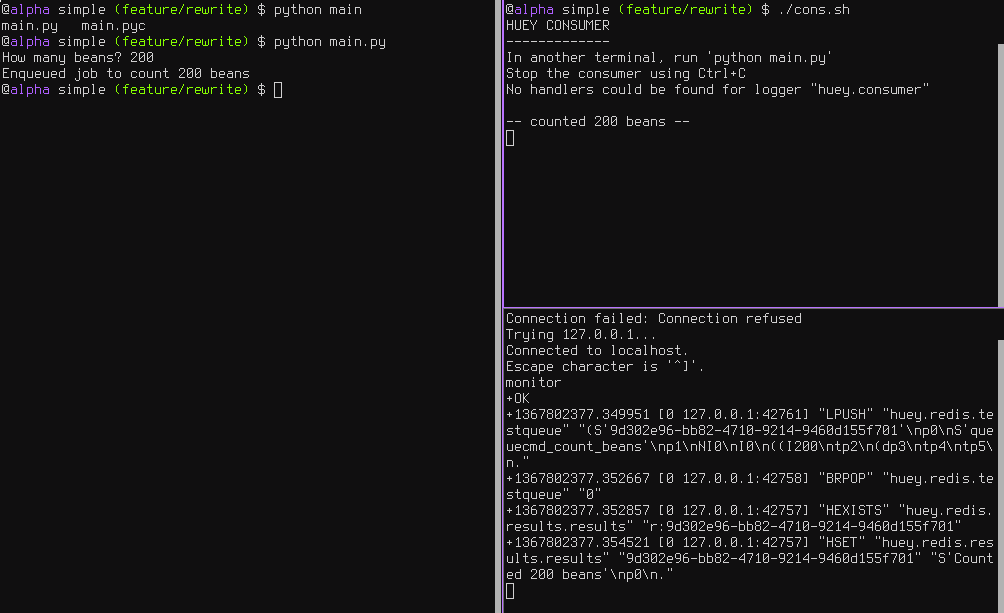
如图所示的这三个进程
左侧是生产者, 右上是消费者, 右下是队列
建议代码目录结构
. ├── __init__.py ├── app.py ├── config.py └── tasks.py
|
首先是配置你的任务队列. 消费者需要一个指明所用后端Huey实例
from huey import RedisHuey huey = RedisHuey()
|
huey对象封装了队列, 而这个队列用来负责存储和收取信息, 你的应用代码中的huey实例使用了后端来协调函数调用.
from config import huey @huey.task() def count_beans(num): print('-- counted %s beans --' % num)
|
上述例子说明了实现消费者的最简方法, 通过装饰器. 当count_beans被 main调用时, 只要enqueueing完成对函数的调用后会立即返回,而不是等待count_beans的执行结果,无论count_beans是否有耗时操作.
我们的主执行程序很简单, 只需要导入配置和任务即可. 这是为了确保当我们在通过指向配置运行consumer时, 任务也被导入并加载到了内存中.
from config import huey from tasks import count_beans if __name__ == '__main__': beans = raw_input('How many beans? ') count_beans(int(beans)) print('Enqueued job to count %s beans' % beans)
|
运行测试
- 注意:
main.huey表示 main.py 中导入 的 huey 实例
- 如果
from config import huey as mmhuey, 则运行脚本是 huey_consumer.py main.mmhuey
huey_consumer.py main.huey python main.py
|
任务结果
上述任务描述了 只发不收 的场景, 但是如果你需要任务的返回结果呢? 为了获取结果, 你只需要在你的任务中返回即可.
注意: 存储结果会浪费大量空间, 如果结果不是必须, 请返回为 None, 或者在 Huey实例中设置 result_store=False
from config import huey @huey.task() def count_beans(num): print('-- counted %s beans --' % num) return 'Counted %s beans' % num
|
from config import huey from tasks import count_beans if __name__ == '__main__': beans = raw_input('How many beans? ') rs = count_beans(int(beans)) print('Enqueued job to count %s beans' % beans) print(rs())
|
在将来某个时刻运行
需要在 main 中调用时, 启用 schedule 来实现
count_beans.schedule(args=(100,), delay=10) count_beans.schedule(args=(100,), eta=datetime.datetime.now() + datetime.timedelta(seconds=60))
|
失败重试机制
直接在 tasks 中使用装饰器
@huey.task(retries=3) def try_thrice(): print('trying....') raise Exception('nope')
|
计划执行任务
使用 crontab 来实现.
from datetime import datetime from huey import crontab from config import huey @huey.periodic_task(crontab(minute='*')) def print_time(): print(datetime.now())
|
取消/暂停任务
普通任务
取消单个实例
res = count_beans(1024) res.revoke() res.restore()
|
取消给定任务的所有实例
count_beans.revoke() count_beans.restore()
|
定期任务
@huey.periodic_task(crontab(minute='*')) def print_time(): print(datetime.now())
|
停止一次
print_time.revoke(revoke_once=True)
|
停止到直到某个时间
now = datetime.datetime.utcnow() in_10 = now + datetime.timedelta(seconds=600) print_time.revoke(revoke_until=in_10)
|
永远停止
随时恢复